
How Adjustable Driver Settings Work & Which Changes Matter
This post contains affiliate links. As an Amazon Associate, we earn from qualifying purchases.
This post contains affiliate links. As an Amazon Associate, we earn from qualifying purchases.
Adjustable driver settings let you change three things: loft, face angle, and the horizontal center of gravity via sliding weights. The loft adjustment is the most powerful, directly altering launch angle and spin to add or subtract carry distance. Face angle tweaks fight a slice or hook. Moving weights influences draw or fade bias, but it’s the adjustment most likely to backfire without a launch monitor.
Most golfers treat the adjustment sleeve like a volume knob, cranking it up or down based on one bad range session. That’s how you lose 15 yards and start hitting snap-hooks. The settings are connected — changing the loft also tweaks the face angle, and moving a weight changes how the head twists through impact. You’re not just picking a number; you’re recalibrating the entire club’s physics.
What follows is a breakdown of each adjustment, the mechanical reason it works, and the single change that delivers results for most players. We’ll also cover why a professional fitting is the only reliable path to your optimal setup.
Key Takeaways
- Loft is your distance lever. Increasing loft adds launch and carry for most players; decreasing loft often costs distance, not gains it.
- Loft and face angle are linked. Adjusting the hosel changes both. A “lower loft” setting typically opens the face, which can worsen a slice.
- Sliding weights are for fine-tuning, not fixing. Moving weight to the heel promotes a draw but can over-correct into a hook. Use this adjustment last.
- Get fitted with a launch monitor. Your swing speed, attack angle, and strike pattern dictate the correct settings. Guessing is expensive.
- Once set, leave it alone. Constantly tinkering with adjustable driver heads based on on-course frustration usually makes things worse.
How Does Adjusting the Loft Change Ball Flight?
Think of loft as your launch controller. It sets the initial angle the ball leaves the clubface, which directly governs spin and carry distance. The common belief is that lower loft equals more distance. For the majority of amateur golfers, that’s backwards.
Increasing driver loft by 1 degree can add 3-5 yards of carry for a player with a slower, more descending attack angle. For a low-spin player, the gain can be over 10 yards.
The mechanics are simple. A higher launch angle gives the ball more time in the air. Combined with optimal spin, it maximizes carry distance. If your launch is too low, the ball falls out of the sky early. If your spin is too low, it won’t stay airborne. Most stock drivers are built for better players, meaning they often come with too little loft for the average swing.
| Swing Speed | Typical Attack Angle | Recommended Loft Starting Point |
|---|---|---|
| Under 85 mph | Descending | 12° or higher |
| 85–95 mph | Level to slightly down | 10.5° – 12° |
| 95–105 mph | Level to slightly up | 9° – 10.5° |
| 105+ mph | Upward | 8° – 9° |
This table is a starting guide, not a rule. Your actual optimal loft depends on your unique combination of swing speed, angle of attack, and where you strike the ball on the face. A launch monitor is the only tool that measures these variables.
This is why understanding driver loft is non-negotiable. It’s the single biggest variable you control in the search for more yards.
The Loft and Face Angle Link (Why It’s Not Just One Setting)
When you turn the adjustment sleeve on your driver’s hosel, you’re rarely changing just the loft. Most systems, like the Callaway OptiFit, alter the loft and the face angle simultaneously. This is the part that scrambles most golfers’ brains.
If you set a 10.5° driver to the “-1°” setting, you’re doing two things: lowering the loft to 9.5° and opening the clubface slightly. An open face aims left of the target for a right-handed golfer (promoting a fade or slice). If you struggle with a slice, lowering your loft might actually make it worse by opening the face.
The reverse is also true. The “+2°” setting increases loft and closes the face slightly, which can help straighten out a slice. You have to know what you’re fixing.
Common mistake: Chasing a lower loft number for ego. You see the pros playing 8° drivers, so you crank yours down. If your swing speed is under 100 mph, you’ve likely just killed your launch and added a slice.
The Fade/Draw Weight Slippery Slope
Beyond the hosel, many drivers have a sliding weight track in the sole. Moving this weight toward the heel promotes a draw (right-to-left for righties). Moving it toward the toe promotes a fade (left-to-right). The principle is sound: moving the center of gravity (CG) influences how the head twists through impact.
Heel weight helps close the face faster. Toe weight helps keep it open.
But here’s the reality from the testing bay: this adjustment is incredibly sensitive. Woody Lashen, a top-100 clubfitter, calls weight adjustment a “slippery slope.” He prefers to start with a driver head that has the right built-in CG, because moving weights always involves a trade-off in other performance areas, like stability or spin.
In one documented test, a golfer with a consistent draw moved the weight to the draw setting. The result wasn’t a straighter ball flight—it was a hook. Some swings registered over -1000 rpm of sidespin, turning a playable draw into an unplayable snap-hook. The fade setting, conversely, produced slices where none existed before.
| Weight Position | Intended Effect | Common Unintended Effect |
|---|---|---|
| Heel (Draw) | Closes face, reduces slice | Can over-correct, causing hooks |
| Toe (Fade) | Opens face, reduces hook | Can over-correct, causing slices |
| Center (Neutral) | Maximizes stability | Less help for a consistent miss |
If you constantly fight a big slice, a draw-biased driver head is a better fix than sliding a weight. If your miss is two-way, leave the weight in the center. Use this adjustment for the finest of fine-tuning, only after loft and face angle are dialed.
Why You Absolutely Need a Launch Monitor Fitting
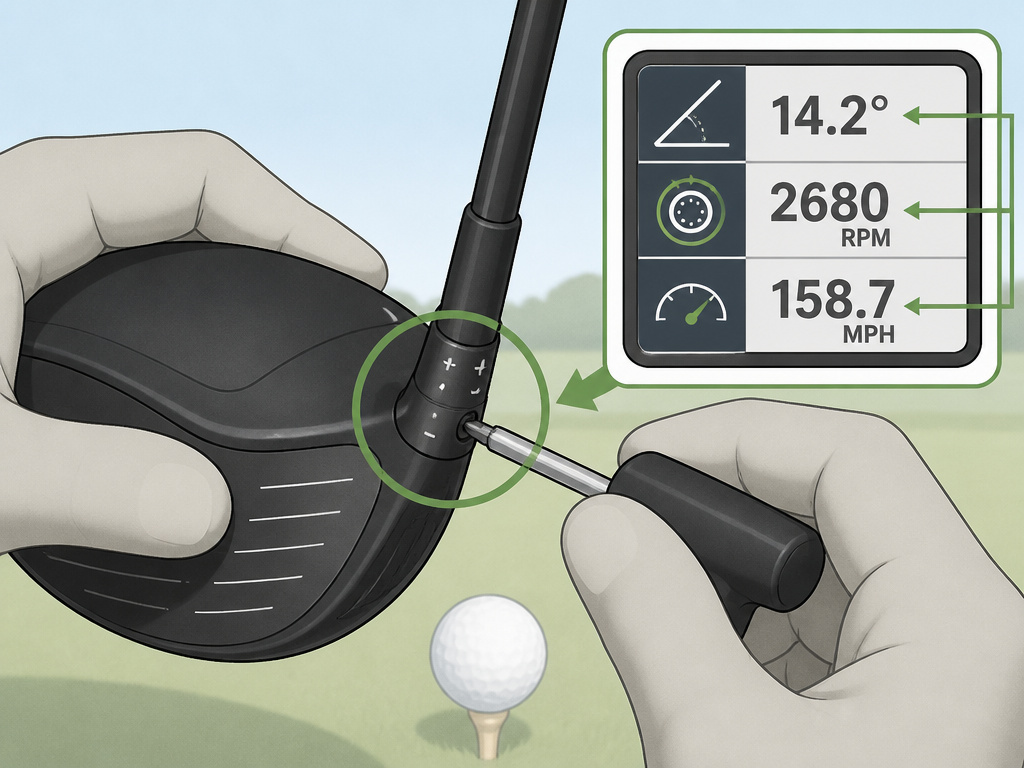
You can’t feel launch angle. You can’t see spin rate. Your perception of whether a drive was “good” is based entirely on result, not on the data that created it. This is why guessing at settings is a fool’s errand.
A professional fitting with a launch monitor (like TrackMan, Foresight, or SkyTrak) measures the seven numbers that actually matter: 1. Clubhead Speed 2. Ball Speed 3. Launch Angle 4. Spin Rate 5. Carry Distance 6. Side Spin / Shot Shape 7. Smash Factor (efficiency)
With this data, a fitter can say, “Your spin is 3500 rpm, which is too high. Let’s try a lower-spin head design and adjust the loft down half a degree.” That’s a prescription. Changing settings based on feel is self-medicating.
Where this goes sideways: A golfer thinks he needs more loft, so he adjusts the hosel to +2°. Unknowingly, he also significantly closes the face. He now hits a low, hooking rocket that never finds the fairway. He thinks the loft change failed, but the face angle change was the culprit.
The fitting also determines your other critical specs, like the correct shaft flex and swing weight. These work in tandem with the head adjustments. The right shaft brings the head into the impact zone correctly; the right head setting then optimizes the launch conditions. It’s a chain.
A Step-by-Step Guide to Dialing In Your Driver
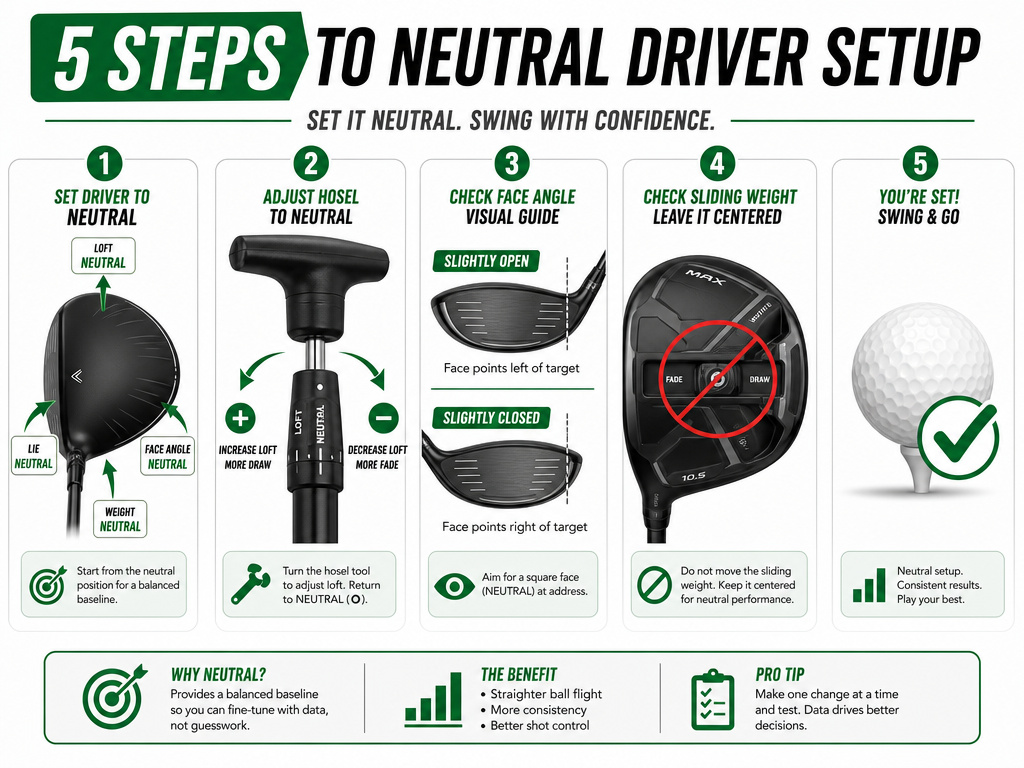
If you’re determined to experiment, follow this sequence. Do it on a launch monitor if possible. If not, use the range and pay attention to ball flight, not just feel.
- Start at Neutral. Reset all adjustments to the standard setting. Hit a dozen shots to establish your baseline ball flight.
- Dial the Loft First. Based on your swing speed (use the table above), adjust the loft one click at a time. Hit 5-10 shots per setting. Look for a higher, more penetrating flight and maximum carry. Ignore total distance until you find consistent carry.
- Check the Face Angle. Understand what your loft change did to the face. If you increased loft and fight a slice, the slightly closed face may help. If you decreased loft and fight a slice, the open face may hurt. You may need to adjust your grip or alignment to compensate.
- Leave the Weights Alone. Seriously. Unless you have a persistent, one-way miss that loft and face angle didn’t touch, don’t touch the sliding weight. Stability is more valuable than a forced draw.
- Verify with Your Gamer Ball. Once you have a promising setting, hit your actual golf ball. Different balls spin and launch differently.
This process takes time and objectivity. The goal is a repeatable, optimal flight, not the one perfect shot.
Frequently Asked Questions
What does the “D” setting on my driver mean?
The “D” setting typically stands for “Draw.” It combines a loft adjustment with a face angle that is closed relative to the target, and often pairs with a heel-weighted bias. It’s a package deal designed to help golfers who slice the ball. Use it cautiously, as it can over-correct.
Can adjusting my driver mess up my swing?
Constantly changing settings can wreck your confidence and feel. If you become reliant on an extreme draw setting to square the face, your swing might get lazier. The driver should fit your swing, not the other way around. Find a good setting and stick with it for a full season.
How does driver adjustability affect my driver’s lie angle?
Most adjustable hosels do not change the lie angle of the driver. Lie angle adjustments are more common in irons. A driver’s lie is generally static, though some high-end models offer limited lie adjustment. Your primary levers are loft, face angle, and CG.
Should I adjust my driver for windy conditions?
It’s generally better to change your ball position and swing than your driver settings. You might tee the ball slightly lower and move it back in your stance to produce a more penetrating flight. Changing the loft lower for wind can work, but it also changes your face alignment and can lead to inconsistency.
Do all adjustable drivers use the same wrench?
No. While many use a standard Torx T25 bit, some manufacturers use proprietary sizes or security bits. Always use the wrench that came with your driver. Overtightening with a different tool can strip the screw or damage the hosel.
The Bottom Line
Driver adjustability is a powerful tool, but it’s not a magic fix. The loft sleeve is where you’ll find real gains, especially if you’ve been playing too little loft. The sliding weights are best left in the neutral position unless you have a professional’s guidance.
Forget the tinkering. The most valuable adjustment you can make is the first one: booking a session with a qualified fitter and a launch monitor. Let the data pick your loft settings, your shaft flex, and your head model. Then, take that driver to the course and learn how to hit it. Consistency beats experimentation every time.
