
How Launch Monitors Work | Radar vs Camera Technology
This post contains affiliate links. As an Amazon Associate, we earn from qualifying purchases.
A launch monitor works by using one of two core technologies to capture the moment of impact: Doppler radar tracks the moving ball and club head using microwave frequency shifts, while photometric (camera-based) systems use high-speed cameras to photograph the ball immediately after it leaves the clubface. Radar measures the actual flight; optical systems calculate a predicted flight from initial launch conditions.
That distinction is the whole game. It decides whether the numbers you see are direct measurements or algorithmic estimates, and it dictates where the monitor can be used reliably.
What follows is a breakdown of the physics, the setup specs that actually matter, and the real-world trade-offs between a portable radar unit and a ceiling-mounted camera system. By the end, you’ll be able to read any product spec sheet and know exactly what you’re buying.
Key Takeaways
- Radar measures, cameras calculate. Doppler radar tracks the full ball flight; high-speed cameras capture a few inches of travel and predict the rest.
- Placement is non-negotiable. Camera systems like the Uneekor EYE XR require mounting exactly 1 meter behind the ball; radar units like the Shot Scope LM1 need 1.4 meters of clear space.
- Indoor reliability splits on technology. Radar trained on billions of real shots predicts indoor flight better than optical algorithms with less reference data.
- Data points depend on the hardware. Basic monitors measure speed and distance; advanced systems add spin axis, club path, and impact location.
- Your goal picks the tool. For outdoor range work, a portable radar monitor wins. For a permanent indoor simulator, a photometric system often integrates more cleanly.
The Two Core Technologies: Radar vs. Camera
Every launch monitor on the market uses either Doppler radar or photometric (high-speed camera) technology. They arrive at similar data through completely different physical methods. Choosing the wrong type for your space is the most expensive mistake you can make.
A radar-based system tracks the ball continuously from impact through the full ball flight, measuring real velocity, trajectory, and aerodynamic behavior across the entire shot. The data is measured, not estimated. An optical system captures a fraction of a second at impact using high-speed cameras, then uses algorithms to predict what the ball would have done based on those measurements.
The industry’s most trusted systems for professional fitting and broadcast, like TrackMan, use radar. Many popular home and simulator-focused units, like the Uneekor EYE XR or Foresight GCQuad, use cameras. One isn’t universally “better”, they are tools for different jobs.
How Does a Doppler Radar Launch Monitor Work?
A Doppler radar launch monitor, like the Shot Scope LM1 or a PRGR Portable Launch Monitor, transmits a continuous microwave signal (often in the 24 GHz K-band) toward the hitting area. When that signal hits a moving object, your club head or the ball, it reflects back to the monitor with a shifted frequency.
This shift is the Doppler effect. The monitor’s processor calculates the speed of the object based on how much the frequency changed. It tracks this for both the club head before impact and the ball immediately after, deriving smash factor (ball speed ÷ club speed). Advanced radar units track the ball for its entire flight, measuring real deceleration and curvature to report true carry, total distance, and shot shape.
Why this matters indoors: A high-quality radar unit’s software contains a massive database of measured ball flights. When you hit into a net, it uses the initial launch data (speed, angle, spin) and matches it to the closest known trajectory from its database to predict the outcome. The quality of that prediction hinges entirely on the breadth and accuracy of that underlying dataset.
| Radar System Example | Core Measurement | Key Limitation |
|---|---|---|
| Shot Scope LM1 | Club speed, ball speed, smash factor, carry distance | Requires 1.4m of clear space behind the ball; less accurate on high-lofted wedges indoors. |
| PRGR HS-130A | Swing speed, ball speed, estimated carry | Basic model; does not measure spin or shot shape. |
| TrackMan | Full ball flight, spin axis, club path, impact location | Premium cost; requires significant space for optimal outdoor use. |
How Does a High-Speed Camera System Work?
Photometric systems use high-speed cameras, often two or more, to take thousands of pictures per second of the ball just as it leaves the clubface. The Uneekor EYE XR uses this method, capturing the ball’s dimples to calculate its rotation. By comparing the ball’s position across successive frames, the system calculates launch angle, speed, and spin rate within the first few inches of flight.
The system then uses aerodynamic models to project the ball’s path. It does not measure the full flight; it predicts it. This is why precise alignment and calibration are critical. If the cameras are misaligned by a degree, the predicted flight can be off by several yards.
Where this goes sideways: Mounting a camera unit like the Uneekor EYE XR even a few inches outside its specified position. The manual requires it to be exactly 3 feet 6 inches (1 meter) behind the tee spot and between 9-10 feet high. Miss that, and the cameras see the launch angle incorrectly. The data will be consistently wrong, and you’ll be practicing with flawed feedback.
Camera systems excel at measuring spin without special balls and capturing club data without stickers (using AI tracking, like Uneekor’s Club Optix™). They are the default choice for a clean, installed indoor golf simulator because they mount out of the way.
What Data Can You Actually Get?
Launch monitors provide a hierarchy of information. You start with ball basics, then add club dynamics, and finally get diagnostic details that explain why the ball did what it did.
- Ball Data (The Essentials): This is what every monitor provides.
- Ball Speed: Velocity off the clubface. The primary driver of distance.
- Launch Angle: Vertical direction the ball takes off. Too low or high kills efficiency.
- Spin Rate: Backspin in revolutions per minute. Controls trajectory and stopping power.
- Carry Distance: How far the ball flies through the air. The most important distance number.
- Club Data (The Swing Story): This requires more advanced technology, either radar that tracks the clubhead or cameras with club-tracking algorithms.
- Club Speed: How fast the clubhead is moving at impact.
- Smash Factor: Ball speed ÷ club speed. A measure of strike quality (1.50 is excellent for a driver).
- Club Path: The direction the clubhead is moving (in-to-out, out-to-in).
- Face Angle: Where the clubface is pointing relative to the path. This dictates the initial shot direction.
- Advanced Diagnostics (The “Why”): High-end systems add layers.
- Spin Axis: Tilt of the spin axis, which causes the ball to curve.
- Impact Location: Where on the clubface the ball was struck. A heel strike loses speed and adds slice spin.
- Angle of Attack: Upward or downward strike with the driver or irons.
If you’re looking at budget launch monitors, expect ball speed and estimated carry. Stepping up to mid-range launch monitors adds club speed and smash factor. True game-improvement analysis requires the club and face data from premium launch monitors.
Setting Up for Accuracy: It’s Not Optional
You cannot buy accuracy. You can only create the conditions for it. The best monitor in the world will lie to you if set up wrong.
For Radar Monitors (e.g., Shot Scope LM1):
- Distance: Place the unit 1.4 meters (4-5 feet) directly behind the ball, on the same level surface.
- Alignment: The face of the monitor must be pointed directly down the target line.
- Clearance: Ensure a clear, unobstructed path between the monitor and the ball. Any object in the way can scatter the radar signal.
For Camera Monitors (e.g., Uneekor EYE XR):
- Position: Ceiling-mounted, exactly 1 meter (3’6″) behind the ball’s position, and 2.7-3 meters (9-10 feet) high.
- Level: The unit must be perfectly level. Use the included bubble level.
- Sight Lines: Keep a clear line of sight between the ball and the cameras. No overhead lights or beams in the way.
- Calibration: Run the full calibration routine using the provided board or software. Do this anytime you move the unit or change lighting.
Common mistake: Assuming a launch monitor is “plug and play.” The Uneekor EYE XR manual explicitly states failure to meet mounting requirements “will result in accuracy issues.” That’s not a suggestion. It’s a cause-and-effect warning.
This meticulous setup is what separates reliable data from expensive guesswork. It’s also why many golfers prefer the simpler placement of a portable launch monitor for outdoor use.
Indoor vs. Outdoor: Where Technology Stumbles
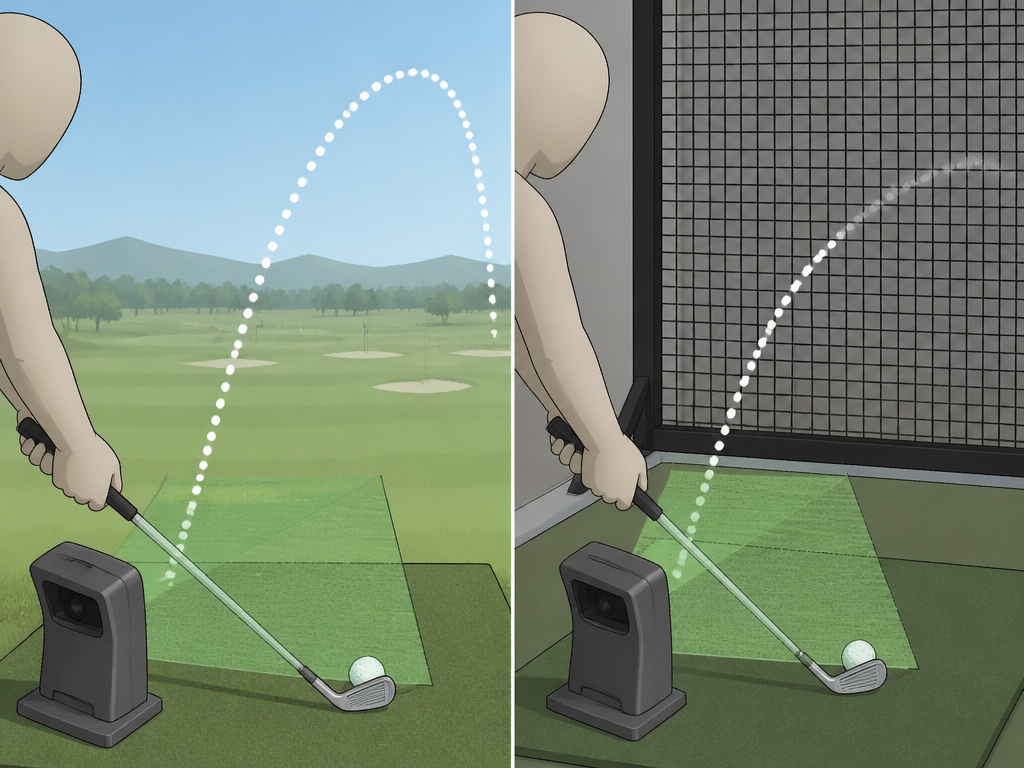 Your environment changes everything. A monitor that’s brilliant outside can struggle inside, and vice-versa.
Outdoor Use (The Ideal Scenario):
This is the easiest environment for accurate data, especially for radar. The monitor can track the entire ball flight, providing measured, not modeled, results for distance, curvature, and apex. This is the gold standard for practice and using a launch monitor to improve your practice at the range.
Indoor Use (The Compromise):
Here, the technology split defines reliability. – Radar Indoors: The monitor only sees the first 10-15 feet of flight before the ball hits the net. It must predict the rest. High-quality radar (like TrackMan) uses a vast database of real shots for this. Lower-quality radar has a weaker predictive model, making it less reliable on high-spin wedge shots or extreme launch angles. – Camera Indoors: The system only ever sees the first few inches. Its entire report is a prediction from that snapshot. Accuracy depends on the quality of its aerodynamic algorithm and, critically, perfect setup alignment.
For a dedicated indoor golf simulator, camera systems are often integrated more neatly. But for trustworthy indoor data, the pedigree of the prediction model, whether radar or camera, is what you’re actually paying for.
Choosing the Right System for Your Game
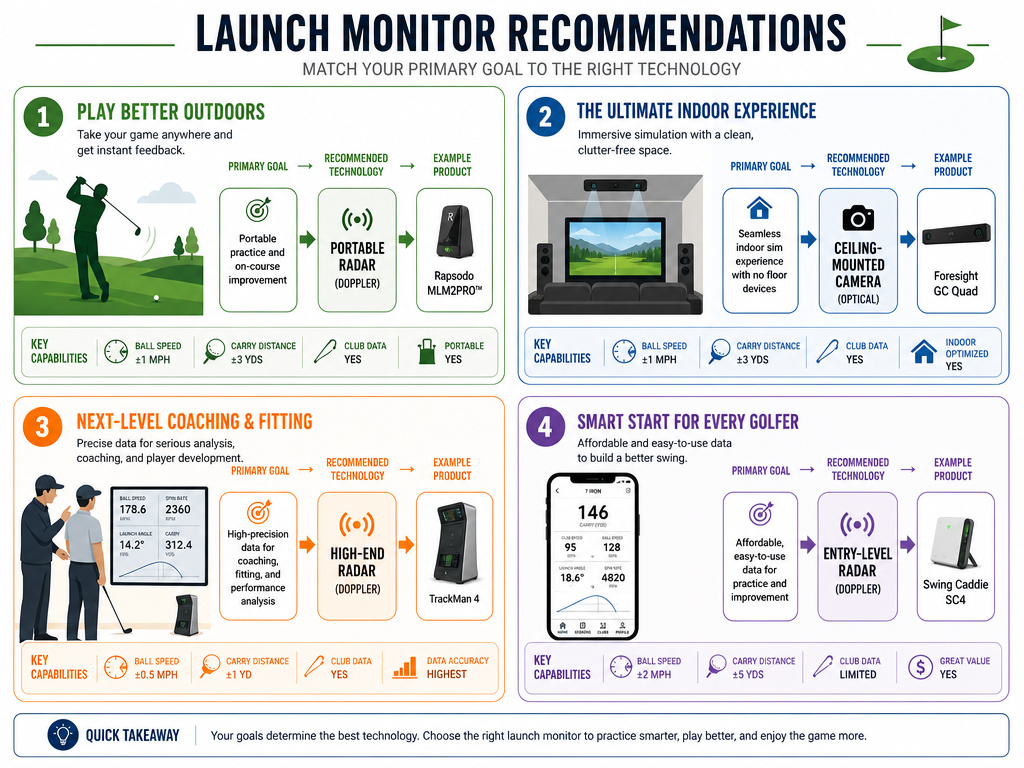 This isn’t about the “best” monitor. It’s about the best monitor for the job you need it to do. Ask these questions in order.
| Your Primary Goal | Recommended Technology | Example Product | Key Reason |
|---|---|---|---|
| Range Practice & Speed Training | Portable Radar | Shot Scope LM1 | Easy setup, measures real ball flight outdoors, focuses on core metrics. |
| Home Simulator Installation | Photometric Camera | Uneekor EYE XR | Clean ceiling mount, integrates with golf simulator software, no stickers needed. |
| Professional Fitting & Coaching | High-End Radar | TrackMan 4 | Industry-standard accuracy for club and ball data, trusted by tours. |
| Basic Swing Feedback | Entry-Level Radar | PRGR HS-130A | Affordable, simple operation, provides speed and estimated distance. |
If you want one answer for the serious amateur building a practice setup: start with a quality portable radar unit like the Shot Scope LM1. It works beautifully outdoors, gives reliable enough data indoors into a net, and teaches you how to use the numbers. It’s the foundational tool. Later, if you build a full simulator, you can add a permanent camera system.
The data from any monitor is only as useful as your ability to interpret it. Pairing your monitor with a good shot tracking system for on-course performance completes the feedback loop, showing you how range practice translates to the real course.
Frequently Asked Questions
What is the most important metric for a beginner?
Smash factor. It tells you how efficiently you’re transferring energy from the club to the ball. A low smash factor means you’re missing the center of the face, regardless of how hard you swing. Improving that number is the fastest path to more distance.
Do I need special balls or club stickers?
It depends on the monitor. Most modern radar units and advanced camera systems like the Uneekor EYE XR do not require stickers. Some camera systems may need them for precise face angle data with certain club finishes. Basic monitors never need them. Almost no system requires special balls anymore, though some camera systems work best with white balls for dimple tracking.
Can a launch monitor help with putting?
Yes, but only specific models. High-end systems like the Uneekor EYE XR have a putting mode that measures ball speed from 0.44mph, launch angle, and skid. Most portable radar monitors are not sensitive enough for meaningful putting data.
Why are some monitors so much more expensive?
You’re paying for three things: sensor accuracy, processing power, and the software model. A premium monitor has more precise sensors, faster processors to handle more data points, and, critically, a more sophisticated (and expensively developed) algorithm for predicting ball flight, especially indoors.
How often do launch monitors need calibration?
Camera-based systems need calibration after any move or significant change in ambient lighting. Radar-based systems are generally more stable and don’t require user calibration. All monitors benefit from occasional factory checks or software updates to ensure the prediction models are current.
The Bottom Line
A launch monitor is a translator. It converts the physics of your swing into a language you can understand. The core choice, radar or camera, determines how that translation happens: through direct measurement of flight or calculation from a snapshot.
For true feedback, respect the setup. The numbers are only honest if the monitor is in its prescribed position. Start with a clear goal: outdoor practice favors portable radar, while a built-in simulator leans toward mounted cameras. Don’t buy more data than you can use. Ball speed, launch angle, and smash factor are enough to transform your practice for years.
Ultimately, the best monitor is the one you use consistently. It’s the bridge between feeling and fact, showing you exactly what your swing is doing so you can change it.
