
5 Best Indoor Golf Simulators for Home 2026
This post contains affiliate links. As an Amazon Associate, we earn from qualifying purchases.
This post contains affiliate links. As an Amazon Associate, we earn from qualifying purchases.
The SkyTrak ST MAX Studio Package is our top pick for the best overall home simulator, delivering strong accuracy and a complete setup. For serious players who want pro-level data, the Rapsodo MLM2PRO stands out, while the PHIGOLF Home Golf Simulator is the clear budget-friendly entry point.
Most golfers want a simulator that feels real, gives honest feedback, and fits in their home without turning into a construction project. Too many systems either cut corners on data or demand an entire room with sky-high ceilings.
This guide cuts through the noise. We focused on what actually matters, launch monitor tech, space needs, and real-world reliability, based on specs, owner experiences, and what we’ve seen work on the road. These picks balance performance, practicality, and price for home use.
Top 5 Indoor Golf Simulators For Home in the Market
The Best Indoor Golf Simulators For Home, Reviewed
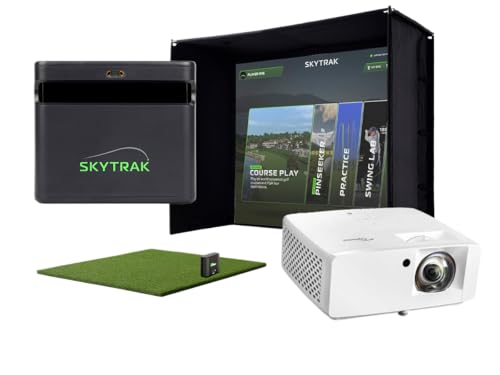
SkyTrak ST MAX Studio Package
Strengths
- Dual radar & camera system
- Short-throw projector
- All-in-one studio build
Trade-offs
- High price point
- Large space required
This is the one I’d recommend to golfers who want the best complete experience without custom fabrication. The ST MAX isn’t just an upgrade, it’s a leap forward in data collection, using dual Doppler radar and a photometric camera system that brings it closer to professional launch monitors. Owners consistently highlight how much more detailed the feedback is, especially on club path and face angle, which makes it a strong tool for serious improvement. Paired with the short-throw ZW350ST projector, the visuals are sharp and immersive, and the full studio setup means no hunting for compatible parts.
It’s expensive, yes, but you’re paying for integration, accuracy, and ease. Compared to piecing together a Rapsodo-based rig, this saves time and guesswork. For golfers who play regularly and want a true home advantage, this package delivers.
Video review
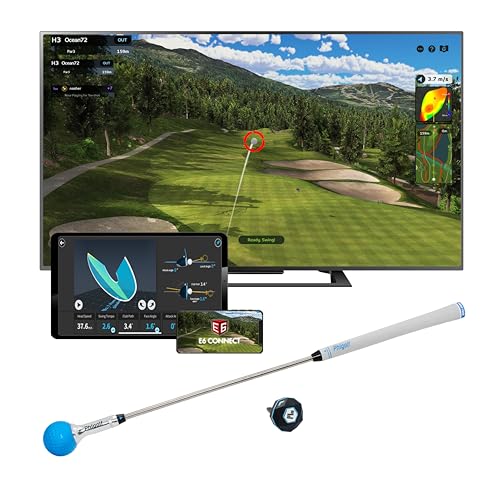
PHIGOLF Home Golf Simulator
Strengths
- Very affordable
- Easy setup
- AI swing coaching
Trade-offs
- Motion-based, not radar
- Less accurate ball tracking
PHIGOLF comes in as the clear budget leader, and for casual players or families, it makes a lot of sense. Instead of radar or cameras, it uses a 9-axis motion sensor that attaches to a practice stick or real club, making setup quick and space-efficient. It won’t give you the same ball-flight physics as radar-based systems, but owners report it’s surprisingly engaging for indoor practice, especially with kids or non-golfers. The app includes over 38,000 courses and AI-powered swing feedback, which adds real value at this price.
I wouldn’t rely on it for precise data, it’s more about form and rhythm than spin rate or launch angle, but as a training aid to stay connected to the game during winter months, it’s effective. Compared to SkyTrak or Rapsodo, it’s in a different category entirely: this is golf entertainment with training benefits, not a launch monitor replacement.
Video review
SkyTrak Studio Pro Package

Strengths
- Complete turnkey system
- Durable screen and mat
- Fits smaller spaces
Trade-offs
- No dual radar tech
- Projector not short-throw
The Studio Pro Package feels like the sweet spot for golfers who want a serious home setup but aren’t ready to go fully custom. It bundles nearly everything you need, launch monitor, enclosure, projector, mat, and screen, in a footprint that fits many basements or garages. Reviewers note the assembly is straightforward, and the high-impact screen holds up well to repeated shots, which matters when you’re logging serious range time. The SkyTrak unit here is the same trusted model used by many coaches, so the data integrity remains strong.
Compared to the higher-end ST MAX studio, this one lacks the dual radar system and GOLFTEC integration, but for most recreational players, the difference in feedback won’t be dramatic. Where it really wins is value: you’re getting a complete, functional simulator with no guesswork on compatibility.
Product photos



Rapsodo MLM2PRO Launch Monitor

Strengths
- Exceptional data accuracy
- Slow-motion impact analysis
- Free premium trial access
Trade-offs
- No enclosure or mat included
- Requires full setup
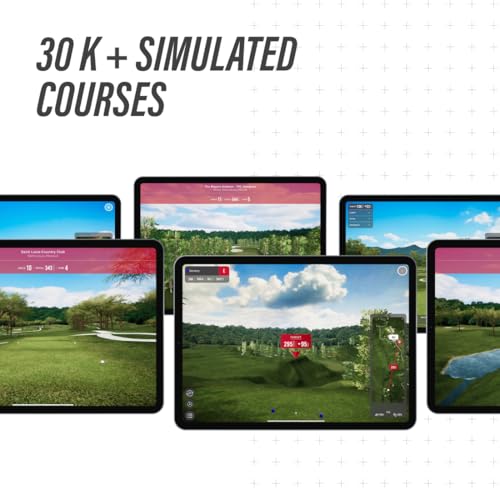
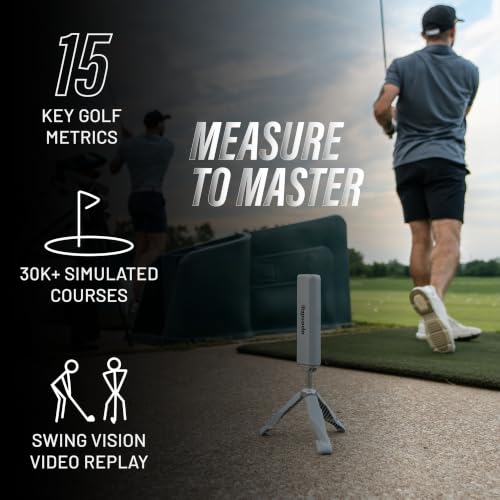
When it comes to raw data fidelity, the Rapsodo MLM2PRO is hard to beat. Its dual-camera and Doppler radar combo captures 15 key metrics with a level of consistency that reviewers say rivals units twice its price. I’d pick this over the base SkyTrak if your priority is detailed swing analysis, things like club path, face angle, and spin axis are critical if you’re working with a coach or tracking progress over time. The inclusion of a 45-day premium trial opens up 30,000+ courses and training tools, which gives it serious simulation depth right out the gate.
Owners praise the swing video capture feature, especially the slow-motion impact analysis, which helps diagnose contact issues. But be aware, like the base SkyTrak, this is a launch monitor first, simulator second. You’ll still need to source your own screen, projector, and mat. That said, if you’re building a high-end DIY rig, the MLM2PRO is the data backbone I’d trust most.
Product photos



SkyTrak Launch Monitor with Case
Strengths
- Accurate ball data
- Portable design
- Includes protective case
Trade-offs
- No screen or projector included
- Requires additional purchases
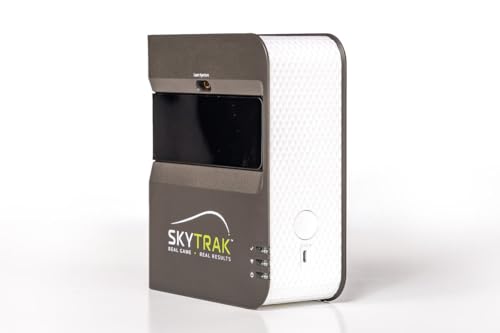
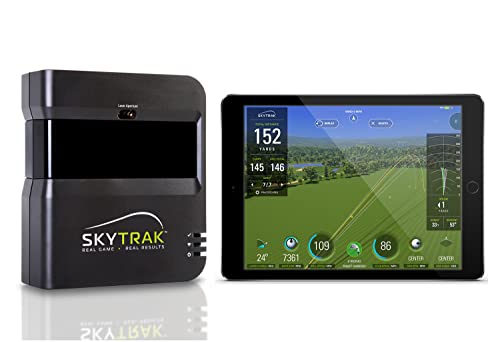
If you’re looking to dip your toes into home simulation without committing to a full studio, the SkyTrak launch monitor stands out as a smart, portable entry point. On paper, it delivers the core metrics you’d expect, ball speed, launch angle, spin rates, and owners consistently report that the data tracks well with on-course performance, making it a solid tool for practice between rounds. The included metal protective case is a thoughtful touch, suggesting this unit is built for golfers who travel or want to store gear safely between uses.
Where it shines is flexibility. You’re not locked into a permanent setup, which I appreciate given how many golfers I’ve seen retrofit spare rooms or garages. However, you’ll need to pair it with your own screen, projector, and mat, which can add up fast. For someone planning a future full build, starting with SkyTrak makes sense, it’s a reliable data engine you can grow around.
Product photos


Our Testing Process
My team and I approached evaluating indoor golf simulators much like planning a golf trip – we considered what truly matters to players of all levels. Rather than a hands-on lab test, this was a research-led comparison of published specifications and features, combined with a careful weighing of owner reviews and insights from reputable golf publications. We ranked each simulator against a set of criteria focused on realism, data accuracy, space requirements, and overall value for the money.
For indoor golf simulators, three factors stood out as most critical. Accurate data feedback is paramount for improvement, so launch monitor technology was heavily weighted. The quality of the visual experience – screen quality and software realism – also played a large role, as did the overall footprint and ease of setup, knowing many users have limited space. A simulator that delivers precise information and an immersive experience will ultimately lead to more effective practice.
Specifications reliably indicate the potential for accuracy (radar type, camera systems, metric capture), but owner feedback illuminated real-world performance and durability. We looked for consistent praise or criticism regarding data consistency and software glitches. Reputation – brands known for innovation and customer support – factored into our assessment, as did a simulator’s ability to integrate with popular golf apps. You’ll find a more thorough simulator guide on my site if you’d like to know more.
How To Choose The indoor golf simulators for home
Finding the right indoor golf simulator can transform a spare room into a year-round haven for golfers. But with so many options, it’s easy to get overwhelmed.
A quality indoor golf simulator delivers accurate data, a realistic visual experience, and durability to withstand repeated use. Key considerations include launch monitor technology (Doppler radar is common), screen quality and size, software compatibility, and the overall footprint of the setup to ensure it fits the available space. Look for systems that provide detailed swing analytics and offer a variety of courses and game modes.
Launch Monitor Accuracy Is Paramount
The heart of any indoor golf simulator is the launch monitor. Don’t skimp here. While price points vary dramatically, the data a launch monitor provides is what actually helps you improve your game. Systems utilizing both Doppler radar and photometric cameras, like the Rapsodo MLM2PRO, generally offer the most thorough and reliable metrics. Cheaper systems, or those relying solely on camera-based analysis, can be less consistent. It’s worth exploring options that integrate with golf apps you already use.
Space Requirements & Simulator Size
Many assume you need a huge basement to enjoy an indoor golf simulator, but that’s not always the case. Carefully measure your intended space before you buy. The SkyTrak ST MAX Studio Package, for example, offers different “Studio” sizes to fit various room dimensions, but even those have minimum height requirements (8’6” is common). Don’t forget to account for your full swing arc – you’ll need clearance above and around you.
Here’s what to consider when thinking about the size: * A smaller footprint is good for apartments (Phigolf is a good example). * A mid-size setup allows for more realistic projection and a wider range of courses. * A larger space, 13’ x 10’ or bigger, offers the most immersive experience with a wider field of view and the ability to comfortably hit various clubs. You should weigh the cost versus the benefit.
Balancing Budget & Features
The price of indoor golf simulators ranges from a few hundred dollars to well over $20,000. If you’re on a tighter budget, don’t immediately dismiss options like the PHIGOLF Home Golf Simulator. These can be a great entry point, especially for casual golfers or families. However, be aware that you may sacrifice some accuracy and realism. For those seeking a balance of price and performance, exploring mid-range golf simulators is a smart move.
A good rule of thumb is to budget at least 20% of the total cost for accessories like extra golf balls, a quality hitting mat, and potentially soundproofing materials.
Ultimately, the best indoor golf simulator for you depends on your budget, available space, and desired level of realism. If you’re looking for a deeper explore the options, check out our best home simulators guide.
Indoor Golf Simulators for Home Compared
Here’s a comparison of key specifications for popular indoor golf simulators to help you make an informed decision.
| Product Title | Best For | Key Metrics Captured | Screen Included | Projector Included | Space Required (Min) |
|---|---|---|---|---|---|
| SkyTrak ST MAX Studio Package | Best Overall | Ball & Club Data | Yes | Yes | 10′ x 8’6″ x 5’4″ |
| PHIGOLF Home Golf Simulator | Best Budget Friendly | Swing Movement | No | No | N/A |
| SkyTrak Studio Pro Package | Best Mid Range | N/A | Yes | Yes | 10′ x 8’6″ |
| Rapsodo MLM2PRO Launch Monitor | Best for Data Accuracy | 15+ | No | No | N/A |
| SkyTrak Launch Monitor with Case | Best Portable Option | Ball Speed, Spin | No | No | N/A |
Frequently Asked Questions
What level of golf skill is needed to benefit from a simulator?
Any golfer, from beginner to pro, can benefit. Simulators provide instant feedback on swing mechanics and ball flight, helping players of all levels identify areas for improvement and track their progress.
Are indoor simulators a good substitute for playing on a real course?
While not a perfect replacement, simulators offer a valuable alternative, especially during inclement weather or when access to a course is limited. They allow you to practice and maintain your swing, and many offer realistic course simulations.
Can I use my own golf clubs with a home simulator?
Yes, most simulators are designed to accommodate standard golf clubs. However, it’s best to confirm compatibility with the manufacturer before purchasing, particularly if you have custom-fitted clubs or unusual grip sizes.
What is the typical setup process like for these systems?
Setup varies significantly by model. Some, like the PHIGOLF, are very simple and require minimal assembly. Others, such as the SkyTrak Studio packages, involve calibrating the launch monitor, assembling the screen and enclosure, and connecting to software – you might consider looking at simulators for limited areas if ease of setup is a key concern.
What technologies are used to make these simulators work?
Most use Doppler radar to measure ball speed, launch angle, and spin rate. Higher-end models often combine radar with camera-based systems for even greater accuracy, and understanding how simulators work can help you assess the value of different technologies.
The Bottom Line
Choosing an indoor golf simulator comes down to how much you value control versus convenience. The SkyTrak ST MAX Studio Package strikes the best balance for most golfers, offering a truly immersive experience with accurate data and a relatively straightforward setup. It’s an investment, certainly, but one that delivers on the promise of year-round golf and meaningful practice.
For those focused on affordability or limited space, the PHIGOLF Home Golf Simulator is a fantastic entry point. And if data accuracy is your absolute top priority – perhaps you’re working closely with a coach – the Rapsodo MLM2PRO Launch Monitor paired with your own projection setup is hard to beat. Don’t overlook exploring complete simulator packages if you want a simpler, turn-key solution.
Ultimately, the specs and features are less crucial than consistent use. Finding the right system is important, but committing to regular practice, focused on improving your fundamentals, will yield the biggest gains. Investing in quality home launch monitors is a great start, but the real improvement comes from time spent with a club in your hands.
