
7 Best Golf Simulators for Home 2026
This post contains affiliate links. As an Amazon Associate, we earn from qualifying purchases.
This post contains affiliate links. As an Amazon Associate, we earn from qualifying purchases.
The SkyTrak Studio Pro Package stands out as the best overall home golf simulator, delivering accurate data and a fully immersive experience. For budget-conscious golfers, the PHIGOLF Home Golf Simulator offers surprising value with access to thousands of courses, while the Garmin Approach R10 is our top pick for portability and ease of use across different spaces.
Choosing a home golf simulator isn’t just about swinging clubs indoors, it’s about finding a system that fits your game, space, and goals without wasting money on features you won’t use. Too many golfers buy based on price or brand hype, only to end up frustrated with inaccurate feedback or clunky software.
This guide cuts through the noise. Based on specs, owner feedback, and what matters most when you’re trying to improve or enjoy the game at home, we’ve identified the top performers across key categories. We looked at launch monitor tech, software quality, course access, and real-world usability to help you make a confident decision.
Top 4 Golf Simulators For Home in the Market
The Best Golf Simulators For Home, Reviewed
PHIGOLF Home Golf Simulator
Strengths
- Affordable entry
- Easy smartphone integration
- Good for beginners
Trade-offs
- Limited shot metrics
- No real ball tracking
- Not for serious data seekers
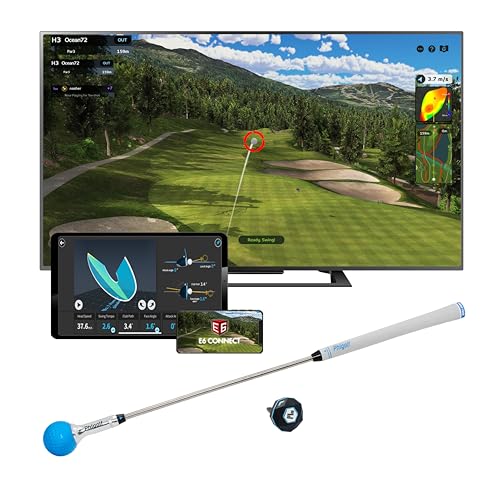
For golfers wanting a low-barrier entry into home simulation, the PHIGOLF system stands out as the most wallet-friendly option that still delivers real value. It leans heavily on your smartphone or tablet, using a 9-axis motion sensor attached to a swing stick or actual club to translate your swing into gameplay through the app. Owners consistently report it’s surprisingly responsive for the price, especially for beginners or casual players who want swing feedback and access to thousands of courses via E6 Connect. The AI swing coach feature is a nice touch, offering visual annotations and basic corrections that can help build awareness, even if it doesn’t match pro-level analysis.
Where it really shines is versatility, this isn’t just a simulator, it’s a practice tool you can take outdoors or use in a small apartment. The ability to switch between virtual play and real-club training makes it more flexible than many higher-end systems. That said, don’t expect pro-grade ball flight modeling. It’s more about motion tracking than launch data, so serious players looking for spin rates or carry distances will feel limited.
Video review
SkyTrak Golf Simulator Studio

Strengths
- All-in-one package
- Accurate shot data
- Large immersive screen
- Durable enclosure
Trade-offs
- High cost
- Needs dedicated space
- Setup takes time
If you’re serious about building a true home golf studio and have the space, the SkyTrak Studio Pro package is the most complete turnkey solution on the market. It bundles the trusted SkyTrak launch monitor with a full enclosure, projector, hitting mat, and protective case, everything you need in one box. The setup requires a dedicated footprint, but owners say the assembly is straightforward and the build feels solid. Once up, the high-impact screen handles real golf shots without flinching, and the projector delivers a large, immersive display that mimics being on the course.
SkyTrak’s reputation rests on reliable data capture using photometric technology, and paired with software like E6 Connect or TGC, it delivers a lifelike simulation experience. Reviewers note the shot tracking is accurate enough for club fitting and serious practice. While it’s a premium investment, it avoids the headaches of piecing together components yourself. I’d pick this over DIY setups for most buyers who want reliability and polish.
Video review
Rapsodo MLM2PRO Mobile Monitor

Strengths
- High-accuracy metrics
- Excellent app integration
- Slow-motion impact analysis
- Great for swing training
Trade-offs
- Requires external screen
- No built-in projector
- Software subscription needed
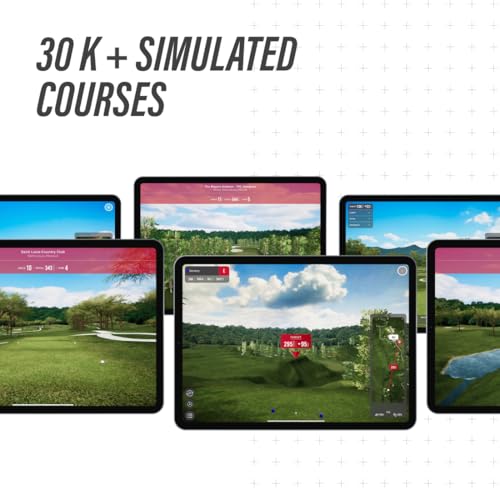
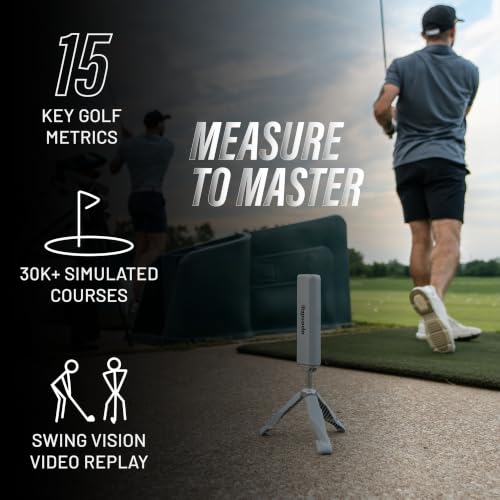
The Rapsodo MLM2PRO is where serious data meets smart design. With a dual-camera system and Doppler radar, it captures 15 key metrics, including spin axis, launch angle, and club path, with accuracy that rivals much more expensive units. Owners praise its consistency, especially for players focused on improving their swing with measurable feedback. What sets it apart is the depth of its app integration. The 45-day premium trial opens up over 30,000 courses and training tools like Impact Vision, which gives slow-motion ball contact analysis, a rare feature at this level.
Even after the trial, the Rapsodo ecosystem remains one of the most polished in the category. Compared to the SkyTrak, it’s more portable and better for on-the-go analysis, though it lacks a built-in screen solution. I’d recommend the MLM2PRO over the Garmin R10 for players who want richer data and deeper training features, even if it costs more.
Product photos



Garmin Approach R10 Monitor

Strengths
- Long battery life
- Durable and waterproof
- Solid metric accuracy
- Easy app pairing
Trade-offs
- Fewer simulation features
- No slow-motion analysis
- Limited course library without subscription
The Garmin Approach R10 hits a sweet spot for golfers who want portability without sacrificing core metrics. It tracks essentials like club speed, ball speed, launch angle, and swing tempo with solid accuracy, and pairs smoothly with the Garmin Golf app to deliver shot dispersion charts and swing videos. What really stands out is the battery life, owners consistently report getting close to 10 hours on a single charge, making it ideal for long range sessions or travel. Its IPX7 rating also means it can handle rain or splashes, a real plus for outdoor use.
While it doesn’t offer the immersive simulation of SkyTrak or the deep metrics of Rapsodo, it’s one of the most reliable portable monitors under $500. I’d pick it over the PHIGOLF if you want real ball tracking and durability, and over the Rapsodo if you prioritize battery life and rugged simplicity.
Product photos


How We Picked These golf simulators for home
My team and I approached evaluating golf simulators for home use as we would planning a golf trip – with a focus on delivering the best experience for the money. Rather than a hands-on lab test, this was a research-led comparison of published specifications and features across numerous models. We then weighed owner reviews from major retailers and insights from respected golf publications to build a ranking based on real-world feedback. Category expertise informed how we prioritized those factors.
For this category, accuracy of data and the overall realism of the simulation were paramount. A simulator is only as good as its ability to replicate the golf experience, so metrics like ball speed, launch angle, and spin rate were heavily considered. Equally important was the breadth of features – access to courses, game modes, and the ability to improve your swing. We also considered value, recognizing that a top-tier experience isn’t necessarily the most expensive one; exploring options like these complete simulator packages was key.
Published specifications reliably indicate the core technology (Doppler radar, camera systems, etc.) and the range of metrics captured. However, judging the quality of that data, and the user experience, required a deep explore owner feedback. People consistently discuss the accuracy of shot tracking and the responsiveness of the software. Reputation matters, too, particularly when considering the long-term support and software updates offered by each brand. Many golfers also seek out simulators with putting as an essential feature.
What To Look For In golf simulators for home
Finding the right golf simulator for your home can feel overwhelming, but focusing on a few key areas will narrow down your choices considerably.
A quality golf simulator delivers accurate data, a realistic visual experience, and engaging software. Buyers should prioritize launch monitor technology (radar or camera-based), screen quality and size, included software features (course access, game modes), and the overall space requirements to create a functional setup. Consider future needs like potential upgrades or multi-player capability.
Launch Monitor Technology
The heart of any golf simulator is the launch monitor. While price often correlates with accuracy, understand what kind of data you truly need. For casual players focused on fun, a system like the PHIGOLF might suffice, relying on motion-tracking and a swing stick. However, if you’re serious about improvement, a Doppler radar system (like those found in the Rapsodo MLM2PRO) or a camera-based system (like Skytrak) will provide more detailed metrics, ball speed, launch angle, spin rate, crucial for identifying swing flaws. Don’t get caught up in chasing every metric; focus on the data points that directly impact your game.
Software and Course Access
A fantastic launch monitor is useless without compelling software. Many simulators bundle software, but the quality varies significantly. Consider how many courses are included, and whether the software integrates with popular platforms like E6 Connect. Some, like the Garmin Approach R10, offer access to over 42,000 courses with a subscription. Also, think about game modes. Do you want stroke play, closest-to-the-pin challenges, or skill-building drills? If you’re looking for options in a moderate budget, exploring simulators under $5,000 is a great place to start.
Space and Setup Considerations
It’s easy to get excited about the technology, but realistically assess your available space. Some systems, such as the SkyTrak Studio Pro Package, are designed for smaller rooms, requiring only a 10-foot wide space. Others demand a dedicated room with higher ceilings. A crucial factor is the impact screen; ensure it’s durable enough to withstand repeated shots. Here’s a quick breakdown:
- Minimal Space: PHIGOLF – great for apartments, limited setup.
- Moderate Space: Garmin Approach R10 – portable, can be used indoors or out.
- Dedicated Room: SkyTrak Studio – offers a more immersive experience, requires more space.
A good rule of thumb: always overestimate the space you’ll need. You don’t want to feel cramped during your swing, and a little extra room makes setup and maintenance much easier.
Ultimately, the best golf simulator for your home depends on your budget, skill level, and available space. Don’t hesitate to research top-rated golf simulators to find the system that best fits your needs.
Golf Simulators for Home Compared
Here’s a spec comparison to help you evaluate different home golf simulator options.
| Product Title | Best For | Key Metrics | Courses Included | Portability | Battery Life |
|---|---|---|---|---|---|
| SkyTrak Studio Pro Package | Best Overall | N/A | N/A | No | N/A |
| PHIGOLF Home Golf Simulator | Best Budget Friendly | 9-axis Motion | 38,000+ | Yes | N/A |
| Rapsodo MLM2PRO Launch Monitor | Best for Advanced Metrics | 15+ | 30,000+ | No | N/A |
| Garmin Approach R10 | Best Portable Option | 8+ | 42,000+ | Yes | 10 hrs |
| SkyTrak Golf Simulator Studio | Best for Full-Space Setup | N/A | N/A | No | N/A |
| Rapsodo MLM2PRO Mobile Monitor | Best for App Integration | 15+ | 30,000+ | Yes | N/A |
| Garmin Approach R10 Monitor | Best Battery Life | 8+ | 42,000+ | Yes | 10 hrs |
Frequently Asked Questions
What level of golf skill is needed to benefit from a home simulator?
Any skill level can benefit, but if you’re a beginner, a simpler system like the PHIGOLF can quickly build your swing fundamentals. More experienced golfers will appreciate the detailed data from systems offering 15+ metrics, like the Rapsodo MLM2PRO, to refine their game.
Are golf simulators accurate enough for serious practice?
Yes, modern simulators with Doppler radar or camera-based technology provide impressively accurate data. Systems like the SkyTrak, when properly calibrated, can deliver ball speed, launch angle, and spin rate data within a few percentage points of outdoor range measurements.
Can I use a golf simulator for more than just playing full rounds?
Absolutely. Beyond simulating entire courses, most simulators offer practice modes, skill-building drills, and virtual driving ranges. Many also integrate with golf instruction apps to help you analyze your swing and identify areas for improvement.
What is the typical cost of setting up a home golf simulator?
Prices vary wildly, but you can find functional simulators under $10,000. Entry-level systems start around $500 (like the PHIGOLF), while complete packages with screens and software can easily exceed $5,000. Remember to factor in the cost of accessories like hitting mats and protective screens.
How much space do I realistically need for a home golf simulator?
The space needed depends on the system. Portable options like the Garmin Approach R10 can be used in a smaller area, while a full setup with a screen requires at least 10 feet of width and 8-10 feet of ceiling height for comfortable swings. Understanding how simulators work will help you determine the best setup for your space.
The Bottom Line
Choosing a golf simulator for your home ultimately comes down to balancing how much control over your practice you want against how much fuss you’re willing to deal with in setup and maintenance. For the most complete and accurate experience, the SkyTrak Studio Pro Package remains the strongest overall choice; its data quality and course options are hard to beat if you’re truly dedicated to improving your game.
If you’re on a tighter budget or need something portable, the PHIGOLF Home Golf Simulator delivers remarkable value and accessibility. For those prioritizing advanced metrics and app integration, the Rapsodo MLM2PRO Launch Monitor stands out, and if space is a concern, explore options like simulators for small spaces. And for golfers seeking the best in portable launch monitor technology, the Garmin Approach R10 is a clear winner.
At the end of the day, the specs and features matter less than consistent practice and a realistic setup. Invest in top-rated home launch monitors that provide data you understand, and focus on building a comfortable and repeatable swing. A simulator is a tool, and like any tool, it’s only as effective as the person using it.
