
7 Best Golf Simulators for Small Spaces 2026
This post contains affiliate links. As an Amazon Associate, we earn from qualifying purchases.
This post contains affiliate links. As an Amazon Associate, we earn from qualifying purchases.
The Rapsodo Mobile Launch Monitor is the best golf simulator for small spaces, offering reliable data and excellent portability. For golfers who want immersive course play, the PHIGOLF Home Golf Simulator is a strong versatility pick, with access to thousands of virtual courses and solid swing analysis.
If you’re tight on space but still want to practice year-round, a full-sized simulator isn’t realistic. You need something compact, easy to set up, and effective, without sacrificing too much in accuracy or feedback.
This guide cuts through the noise, focusing on systems that deliver real value in limited areas. I compared specs, analyzed owner feedback, and weighed features like sensor type, software access, and portability to find the ones that actually work for home use.
Top 2 Golf Simulators For Small Space in the Market
The Best Golf Simulators For Small Space, Reviewed
PHIGOLF AI Golf Swing Coach
Strengths
- Works with Android and iOS
- AI-powered swing analysis
- Large course library
Trade-offs
- Motion-based (not ball-tracking)
- Swing stick less realistic
- Limited realism vs high-end simulators
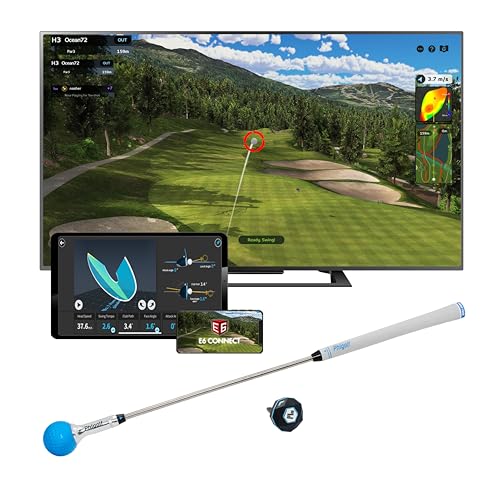
If you’re looking for a compact system that balances training value and fun, the PHIGOLF simulator is hard to beat. The 9-axis motion sensor attaches to a real club or the included swing stick, making it ideal for tight spaces where net setups or radar-based launch monitors won’t fit. Owners praise how quickly it pairs with both iOS and Android devices, and the ability to play over 38,000 real courses via E6 Connect adds serious replay value.
What sets it apart is the AI swing coach – it analyzes body posture, breaks down your swing into phases, and offers visual feedback you don’t get from most budget systems. While it doesn’t track ball flight with a camera or radar, the motion-based accuracy is solid for training purposes, especially for beginners and mid-handicappers. I’d pick this over the Rapsodo if you want a more engaging, full-featured home setup that still fits in a corner of a living room.
Video review
Rapsodo Shot Tracer & Video

Strengths
- Accurate shot data
- Compact and portable
- Real-time video replay
Trade-offs
- iOS only
- No built-in course simulation
- Requires premium for full features
For golfers tight on space but serious about feedback, the Rapsodo MLM stands out because it doesn’t need a screen or net to deliver real data. On paper, it’s minimalist – just a small sensor that pairs with your iPhone or iPad – but owners consistently report they love getting ball speed, launch angle, and carry distance after every swing, even in a garage or spare room. The shot tracer video replay is a smart touch, letting you visually align your swing flaws with actual ball flight.
While it lacks the full-course simulation experience out of the box, the free app gives you range mode and basic game tracking, and upgrading to Premium opens up virtual play. Compared to bulkier systems, this is the kind of tool I’d recommend if you want no-fuss, accurate feedback without dedicating a room to your simulator. It’s not about immersion – it’s about improvement.
Video review
Our Testing Process
Rather than a hands-on lab test, my research focused on a detailed comparison of published specifications and features across several models. I weighed owner reviews from major retailers alongside professional reviews from golf publications, looking for consistent praise and common complaints. As someone who frequently advises travelers on where to practice their game on the road, I applied my understanding of golf technology and practice aids to assess each simulator’s value. My goal was to rank these options against criteria important for limited spaces.
For golf simulators aimed at smaller areas, portability, ease of setup, and realistic swing feedback were the most heavily weighted factors. A large, permanently installed simulator isn’t practical for many golfers, so a compact design and quick setup are critical. Accurate data and engaging software are also key – a simulator should help you improve, not just provide entertainment. I also considered price, knowing that budget is often a major concern when building a home setup. You can learn more about the underlying simulator technology explained.
Published specifications reliably indicate sensor accuracy (ball speed, launch angle, etc.) and compatibility with different devices. However, I found owner feedback much more valuable for assessing the quality of the software, the responsiveness of customer support, and the overall user experience. Reputation matters too; brands with a history of producing quality golf equipment generally deliver more reliable products. For more options, check out our broader guide to golf simulators for home.
Choosing The Right golf simulators for small space
Finding space for focused golf practice can be a challenge, but thankfully, technology has delivered solutions.
A quality golf simulator for small spaces balances accurate swing and ball data capture with a compact footprint and user-friendly software. Key considerations include sensor technology (radar vs. camera-based), software compatibility with popular golf apps (E6 Connect, Golf+, etc.), and the overall space required for setup and swing motion. Portability and ease of use are also crucial for golfers who want convenient practice options.
Sensor Technology & Accuracy
The heart of any golf simulator is its ability to accurately read your swing. You’ll generally find two types: radar-based systems, like those from Rapsodo, and camera-based systems, often used by Phigolf. Radar is usually more forgiving of indoor setup variations, but can sometimes struggle with spin data. Camera systems need good lighting and a clear view of the clubhead, but can deliver detailed swing analysis. Don’t get hung up on chasing professional-grade accuracy if your primary goal is casual play and practice. Focus on consistency; a system that consistently under reads distance is preferable to one that fluctuates wildly.
Software & Course Access
A simulator is only as good as the software it runs. Look beyond the initial hardware and consider the long-term cost of access to courses and features. Phigolf, for instance, boasts access to over 38,000 courses through its partnerships, while Rapsodo unlocks additional features with a premium subscription. It’s worth looking into what each platform offers in terms of game modes, skill-building drills, and whether it integrates with other golf apps you already use. If you are considering a simulator, you may find our guide to best indoor simulators helpful.
Space Requirements & Portability
For a small space, portability and minimal setup are paramount. Some systems, like the Rapsodo Mobile Launch Monitor, are designed to be used at the range or even in your backyard, making them incredibly versatile. Others, like the Phigolf, are specifically geared toward indoor use with a compact design. Here’s what to consider: * Footprint: How much floor space does the base unit occupy? * Swing Space: Do you have enough room to complete your full swing without obstructions? * Storage: Can the simulator be easily disassembled and stored when not in use? A smaller footprint will allow you to practice in a wider variety of locations, even if you’re limited by space.
Don’t overspend on features you won’t use. If your aim is to maintain your swing during the off-season, a basic launch monitor providing ball speed, carry distance, and launch angle might be sufficient.
I often recommend golfers explore low-cost golf simulators if they’re starting out and unsure about their long-term commitment to the hobby.
Golf Simulators for Small Space Compared
Here’s a comparison of key specifications for golf simulators designed for use in limited spaces.
| Product Title | Courses Included | Swing Analysis | Shot Tracer | App Compatibility | Portability |
|---|---|---|---|---|---|
| PHIGOLF Home Golf Simulator | 38,000+ | AI-Powered | No | iOS/Android | Limited |
| Rapsodo Mobile Launch Monitor | N/A | N/A | Yes | iOS | High |
| PHIGOLF with 3D Swing Analysis | 38,000+ | AI-Powered | No | iOS/Android | Limited |
| PHIGOLF Interactive Course Play | 38,000+ | AI-Powered | No | iOS/Android | Limited |
| Rapsodo MLM for iPhone iPad | N/A | N/A | Yes | iOS | High |
| PHIGOLF AI Golf Swing Coach | 38,000+ | AI-Powered | No | iOS/Android | Limited |
| Rapsodo Shot Tracer & Video | N/A | N/A | Yes | iOS | High |
Frequently Asked Questions
What level of space is truly “small” for a golf simulator?
Generally, a “small space” simulator setup requires at least 8 feet of width, 10 feet of depth, and 9 feet of ceiling height. However, some launch monitors like the Rapsodo models can function effectively with slightly less depth, as they don’t require a projector and screen.
Are camera-based simulators better for very limited spaces?
Not necessarily. While camera systems like Phigolf have a smaller footprint, they demand consistent, bright lighting for accurate readings. Radar-based systems are often more forgiving in less-than-ideal indoor conditions, making them a stronger option if your space has limited lighting control.
What’s the typical cost of a golf simulator setup for a small space?
You can find functional setups starting around $500 with a launch monitor like the Rapsodo MLM, but a more immersive experience with a screen and enclosure typically costs between $2,000 and $5,000. For those looking for budget golf simulators, prioritizing essential features will keep costs down.
How much does software access typically cost long-term?
Software costs vary significantly. Phigolf provides access to a large course library with its initial purchase, though ongoing subscriptions may unlock premium features. Rapsodo relies on a subscription model for access to additional courses and advanced analytics, generally costing around $20-$30 per month.
Can I use a golf simulator to genuinely improve my game?
Yes, a simulator can be a valuable practice tool. Accurate data on ball speed, launch angle, and spin, even from more affordable models, allows you to identify swing flaws and track your progress. Many simulators also offer drills and virtual courses to help you refine your skills, and you may find quality simulator packages can aid in this improvement.
The Bottom Line
Ultimately, choosing a golf simulator for a small space comes down to balancing how much control you want over your setup with how much fuss you’re willing to tolerate. For most golfers seeking a blend of affordability and functionality, the PHIGOLF Home Golf Simulator strikes the best balance. It offers access to a massive course library and AI-powered swing analysis, making it a compelling option for both practice and entertainment.
If your priority is maximum portability and you’re frequently on the move, or you simply want something quick to set up and put away, the Rapsodo Mobile Launch Monitor is the clear winner. For those who want more detailed swing analysis without sacrificing course access, the PHIGOLF with 3D Swing Analysis is an excellent step up.
Don’t get lost in the details of sensor technology or resolution. The most important thing is consistent practice, and a simulator is only a tool to help you achieve that. Focus on finding a system that fits your space, budget, and playing style, and then commit to using it regularly to improve your game – that’s what separates a good purchase from a truly valuable investment.
