
Strokes Gained Around the Green: The Key Short Game Metric
This post contains affiliate links. As an Amazon Associate, we earn from qualifying purchases.
This post contains affiliate links. As an Amazon Associate, we earn from qualifying purchases.
Strokes Gained Around the Green (SGAG) measures your performance on shots from within 30 yards of the green’s edge, excluding putts, by comparing your results to a professional benchmark. The formula is: SGAG = (Avg. Strokes to Hole Out from Start) – (Avg. Strokes to Hole Out from End) – 1. A positive number means you gained strokes on the field; a negative number means you lost them.
That 30-yard radius is the critical zone. It covers every chip, pitch, and greenside bunker shot. The benchmark data, drawn from millions of PGA Tour shots via the ShotLink system, tells you the average number of strokes a tour pro needs to finish from any given lie and distance.
Your job is to understand where your game leaks strokes inside that circle, not to match the tour average. The rest of this guide walks through the calculation, why it beats old stats, and where to direct your practice time so the number moves in the right direction.
Key Takeaways
- Strokes Gained Around the Green applies only to non-putt shots that start within 30 yards of the green’s edge. Consumer apps like Arccos sometimes use a 50-yard cutoff, which changes the data.
- The statistic isolates your short-game skill by removing the putt. A successful “up and down” with a poor chip and a great putt hurts your SGAG.
- PGA Tour averages show that 0.3 strokes gained per round indicates a genuinely sharp short game. The single-season record is 0.728.
- Data from a single round is unreliable “noise.” You need 15-20 tracked rounds for your SGAG pattern to stabilize and show a true weakness.
- Improving your SGAG is about proximity from every lie. Practice isn’t just hitting chips; it’s measuring how close they finish from sand, rough, and tight fairway lies.
The Strokes Gained Around the Green Formula
Forget subjective feel. The strokes gained calculation uses a cold, objective math.
Every location on a golf course has a benchmark value: the average number of strokes a PGA Tour player needs to hole out from that specific spot. This value comes from the Tour’s ShotLink database. A shot from the fairway 20 yards from the pin has one benchmark. A buried lie in a greenside bunker 10 yards out has a much higher one.
Your SGAG for a single shot is the benchmark at your starting location, minus the benchmark at your ending location, minus one stroke for the shot you just hit.
SGAG = Benchmark (Start) – Benchmark (End) – 1
If you start in a position where the benchmark is 2.5 strokes. You hit a chip that finishes in a spot where the benchmark is now 1.3 strokes. You used one stroke. Your SGAG for that chip is 2.5 – 1.3 – 1 = +0.2. You gained two-tenths of a stroke on the field.
Do that ten times a round and you’ve gained two full shots. That’s the difference between a 78 and a 76.
| Shot Scenario | Benchmark (Start) | Benchmark (End) | SGAG Calculation | Result |
|---|---|---|---|---|
| Greenside Bunker, 10 yds | 2.47 | 1.23 (5-foot putt) | 2.47 – 1.23 – 1 | +0.24 |
| Fairway Chip, 15 yds | 2.15 | 2.90 (chunked to 40 ft) | 2.15 – 2.90 – 1 | -1.75 |
| Rough Pitch, 25 yds | 2.60 | 1.50 (8-foot putt) | 2.60 – 1.50 – 1 | +0.10 |
The “minus one” in the formula is what isolates the quality of the stroke. It charges you one full stroke for the attempt, then grades you on how much you improved your expected score.
Where “Around the Green” Actually Starts and Ends
The official PGA Tour definition draws the line at 30 yards from the green’s edge. Not the pin. The edge.
This matters because consumer tracking systems sometimes use different boundaries. The Arccos Caddie app, for example, has historically used a 50-yard cutoff for its “Around the Green” category. If your app uses 50 yards, your data will include longer pitch shots that the PGA Tour statistic files under Strokes Gained: Approach. Your numbers won’t match the tour benchmarks directly.
The 30-yard rule includes every shot type you’d use to recover: the basic chip, the lofted pitch, the explosion from sand, even the putt from the fringe if you choose to putt it. The moment your ball comes to rest on the putting surface, the shot category switches to Strokes Gained: Putting.
The official PGA Tour statistic defines “around the green” as any non-putt stroke played from within 30 yards of the green’s edge. This zone covers chips, pitches, and greenside bunker shots. The benchmark data for each lie and distance is derived from the Tour’s ShotLink system, which has logged millions of such shots.
Turf conditions inside this circle change everything. A study cited in the R&A playability condition guidelines notes that firmness and grass type dramatically affect ball roll. Your home course’s damp, grainy rough presents a different challenge than the tight, firm lies of a desert resort. Good SGAG analysis accounts for that variability.
SGAG vs. Scrambling: Why the Old Stat Lied to You
For decades, golfers used “scrambling percentage” – how often you get up and down after missing a green. The PGA Tour average hovers around 59%. It’s a clean, simple number.
It’s also a liar.
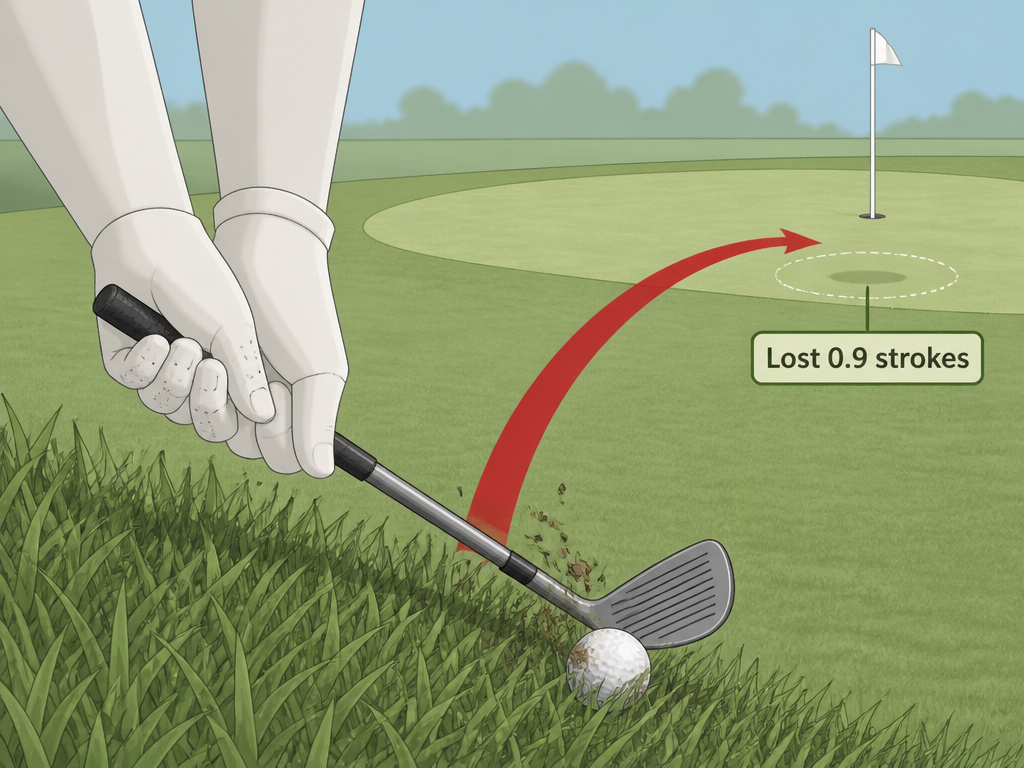
Scrambling counts the chip and the putt as a single unit. If you chunk a chip to 40 feet and then sink the putt, you get a checkmark. Your scrambling percentage goes up. The stat says you succeeded.
The strokes gained system sees a disaster. That poor chip moved you from a benchmark of, say, 2.2 strokes to hole out, to a new benchmark of 2.1 strokes (because 40-foot putts are hard). The calculation is 2.2 – 2.1 – 1 = -0.9. You lost almost a full stroke to the field with that chip, but the putt bailed you out. Scrambling celebrated. Strokes gained tells the truth: your short game cost you.
Where this goes sideways: Chasing a high scrambling percentage. You can improve that number by making more long putts, which masks a terrible chipping performance. Strokes gained around the green isolates the chip, so you can’t hide.
This is the core value of strokes gained analytics. It separates skills that traditional statistics lump together. It forces you to confront the actual source of your strokes lost.
What the PGA Tour Benchmarks Tell You
The numbers set the standard. On the PGA Tour, a positive SGAG is exceptional.
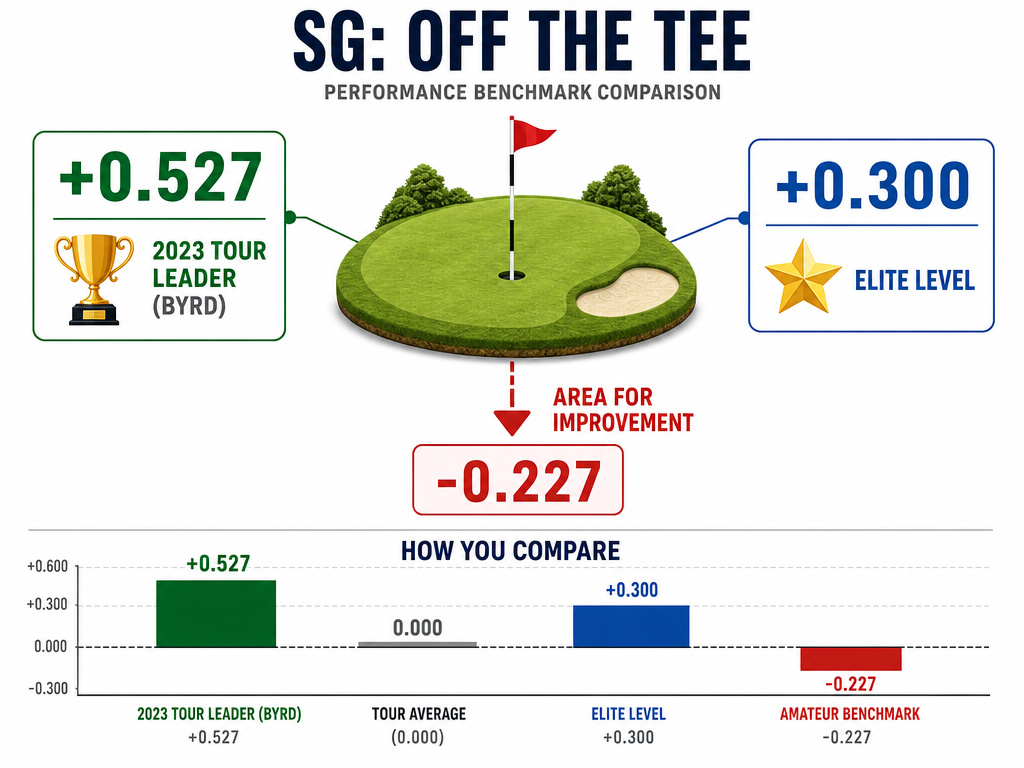
In 2023, Jonathan Byrd led the Tour with an average of 0.527 strokes gained per round. Over a full season, that meant he gained nearly 20 total strokes on the field with his short game alone. The all-time single-season record belongs to Chris Riley, who posted a 0.728 average in 2009.
For context, a player who averages +0.3 strokes gained is considered to have a elite-level short game. The difference between a tour winner and a journeyman often lives in these tenths of a stroke.
For amateurs, the benchmarks are different but the principle is the same. If you’re a 15-handicap, you should compare your SGAG to the benchmark for 15-handicappers, not to Rory McIlroy. Platforms like Arccos and Shot Scope build these strokes gained benchmarks from millions of amateur shots. Your report will show you’re losing 1.2 strokes per round around the green compared to other 15-handicappers. That’s your target.
| Performance Level | Strokes Gained: Around the Green (Per Round) | What It Means |
|---|---|---|
| Record Elite (PGA Tour) | +0.728 (Chris Riley, 2009) | Historic short-game season. |
| Tour Leader (2023) | +0.527 (Jonathan Byrd) | Best on tour for the year. |
| Sharp Short Game | +0.300 | Clearly above tour average. |
| Tour Average | 0.000 | Baseline. Neither gaining nor losing. |
| Area for Improvement | Negative | Losing strokes to the benchmark field. |
The takeaway is simple. If your SGAG number is negative, you’re below average. The size of the negative number tells you how urgent the problem is.
How to Measure Your Own Strokes Gained Around the Green
You need data. Guessing doesn’t work.
Three consumer platforms automatically track shots and generate strokes gained reports, including SGAG. They each have a different hardware approach.
Arccos Caddie uses small sensors that screw into the grip end of each club. They pair with the Arccos app on your phone via Bluetooth. The system auto-detects shots using GPS and the sensor impact. It’s the most hands-off method. The annual subscription provides benchmarks against players of your handicap.
Shot Scope uses a GPS watch or a set of earbuds with built-in shot tracking. There are no club sensors. The system uses the wearable’s GPS to detect shot locations. It’s a one-time hardware purchase with no ongoing subscription, which is a major plus for some golfers.
Garmin Golf integrates with compatible Garmin GPS watches. If you already own one, you can activate shot tracking within the Garmin Golf app. It requires more manual input than Arccos but lives inside an existing ecosystem.
All three systems will give you an SGAG number. Your first report will be a shock. Most amateurs underestimate how many strokes they lose from inside 30 yards.
The part nobody mentions: Your SGAG from a single round is meaningless noise. One lucky chip-in or one bad day putting skews it. You need a minimum of 15-20 tracked rounds for the data to smooth out and reveal your genuine trend line. Don’t panic over one number.
The 3 Drills That Move the SGAG Needle
Knowing your number is step one. Changing it is step two. Generic chipping practice won’t cut it. You need drills that target the specific skills SGAG measures: proximity from varied lies.
1. The 3-Ball Proximity Drill. Take three balls to your practice chipping area. Pick a target hole. Hit one chip from the fairway, one from the rough, and one from a greenside bunker (if available). Measure how close each finishes. Don’t just hit shots; record the distances. Your goal is to shrink the average proximity from each lie over time. This directly mimics the SGAG calculation, which rewards leaving the ball closer to the hole from any starting condition.
2. The Up-and-Down Clock. Place 12 balls in a circle around a hole, each about 15 feet away. Your task is to get each ball up and down in two shots or less. But here’s the key: only count the chip as a success if it finishes inside a three-foot circle. The putt is irrelevant for this drill’s purpose. This trains the SGAG mindset—the chip must create a makeable putt to gain strokes. These are the foundational short game drills that build consistency.
**3. Lie-Based Shot Selection.Practice involves both technique and decision-making. Set up two stations: one with a tight lie where a bump and run is the right choice, and one with a fluffy lie where a lofted pitch or flop shot is needed.Hit five shots from each, choosing the correct technique. SGAG punishes the wrong choice more than a slightly off strike. Knowing the difference between pitching and chipping is a strokes gained skill.
Physical course conditions are a variable you can’t control but must understand. Resources like the Penn State green speed factors guide explain how moisture, grain, and turf health affect roll. A chip on slow, dewy morning greens requires more force than the same chip in the afternoon. Good players adjust instinctively. Your practice should include reading these conditions.
Common SGAG Calculation Errors (And How to Fix Them)
The data only helps if it’s right. These mistakes corrupt your SGAG analysis.
Mistake 1: Using the wrong baseline. Comparing your SGAG to the PGA Tour benchmark when you’re a 20-handicap is demoralizing and useless. Make sure your tracking app is set to compare you to players of your own handicap level. The strokes gained data for different handicaps shows wildly different expectations.
Mistake 2: Mis-categorizing shots. Did that 40-yard pitch start from 31 yards or 29 yards? One counts as Strokes Gained: Approach, the other as SGAG. GPS tracking in apps can have a 2-3 yard variance. Manually check and correct shot locations in your app after the round, especially near the 30-yard boundary. Clean data is everything.
Mistake 3: Ignoring the lie. The benchmark for a shot from the fairway is lower (better) than from the rough or sand. If your app asks you to tag the lie, do it. If you always mark everything as “fairway,” your SGAG will look artificially good when you chip from rough, and artificially bad when you chip from fairway. The system can’t help you if you feed it garbage.
A 2021 peer-reviewed turfgrass brushing study found that aggressive green maintenance like stiff brushing can reduce ball roll by over 20 centimeters. Your chip to a recently brushed green might check up faster than expected. That’s not a technique flaw; it’s a condition variable. Over time, these oddities balance out. Over a single round, they can wreck your SGAG number and your confidence. Trust the long-term trend.
Frequently Asked Questions
What’s a good Strokes Gained Around the Green number for an amateur?
It depends entirely on your handicap. A good number is anything positive relative to the benchmark for your specific handicap level. For a PGA Tour player, +0.3 per round is excellent. For a 15-handicap, a “good” number might be -0.5 if the average 15-handicapper is at -1.0. The goal is to be better than your peer group, not to match a tour pro.
Do putts count in Strokes Gained Around the Green?
No. Absolutely not. The moment your ball is on the putting surface, the shot category switches to Strokes Gained: Putting. SGAG is strictly for non-putt strokes played from within 30 yards of the green’s edge. This separation is the entire point—it isolates your chipping and pitching skill from your putting skill.
How is Strokes Gained: Around the Green different from Strokes Gained: Approach?
It’s a matter of distance. Strokes Gained: Approach covers shots that start outside 30 yards from the green’s edge (and includes par-3 tee shots). Strokes Gained: Around the Green covers shots that start inside that 30-yard boundary. Think of it as Approach for long irons and wedges from distance, and Around the Green for the recovery shots near the green.
Can I calculate Strokes Gained Around the Green by hand?
Technically, yes, if you have access to the benchmark tables from Mark Broadie’s book “Every Shot Counts” or a similar source. You’d note your starting lie and distance, find the benchmark, play your shot, note your ending lie and distance, find that benchmark, and do the math. In practice, this is incredibly tedious. Using a shot-tracking app like Arccos or Shot Scope automates the entire process and is the only realistic method for ongoing analysis.
Why is my Strokes Gained Around the Green so different from my scrambling percentage?
Because they measure different things. Scrambling percentage is a binary result: did you get up and down in two shots? It combines your chip and your putt. SGAG only evaluates the chip. You can have a high scrambling percentage because you’re a great putter, but a negative SGAG because your chips are poor. SGAG tells you the truth about your short-game ball-striking.
Does driving affect Strokes Gained Around the Green?
Not directly. Your driving performance is measured under Strokes Gained: Off-the-Tee. However, a wild drive that leaves you 30 yards from the green in thick rough instead of the fairway means your SGAG shot starts from a much harder lie. So while driving doesn’t change the SGAG calculation itself, it directly influences the difficulty of the shots you’ll face in the SGAG category.
Before You Go
Strokes Gained Around the Green is a specific measurement, not just another vague golf tip. It tells you, with decimal-point precision, whether your chipping and pitching are helping or hurting your score.
Forget how your chips look. Focus on where they finish. The number doesn’t care about style. A ugly bump-and-run that ends three feet away gains more strokes than a beautiful flop shot that settles 15 feet out.
Get the data. Use Arccos, Shot Scope, or Garmin. Track 20 rounds. Find out if you’re losing one stroke a round or three. Then take that information to the practice green and work on proximity from every lie you face. That’s how you turn a negative number into a positive one. That’s how you lower your scores.
