
6 Best Golf Simulators with Putting (2026)
This post contains affiliate links. As an Amazon Associate, we earn from qualifying purchases.
This post contains affiliate links. As an Amazon Associate, we earn from qualifying purchases.
Choosing the right golf simulator with putting can be frustrating when inaccurate data or poor putting integration undermines your practice. The best systems solve this by combining high-precision launch monitoring with realistic putting surfaces and responsive software that captures stroke details for true-to-life performance. We evaluated each model based on accuracy, putting functionality, user feedback, and value across price points to ensure our recommendations deliver real improvement and immersive play. Below are our top picks for the best golf simulators with putting, tailored to different needs and budgets.
Top 2 Golf Simulators With Putting in the Market
Best Golf Simulators With Putting Review
SkyTrak Studio Pro with Putting Turf

ADVANTAGES
LIMITATIONS
Step into a true home golf sanctuary with the SkyTrak Studio Pro, a fully enclosed, projector-powered simulator that delivers tour-level realism for full swings and authentic putting dynamics. At its core, the SkyTrak launch monitor uses photometric tracking to capture real ball flight with precision, while the included custom putting turf and 5×5 hitting mat create a seamless transition from driver to putter. This isn’t just a simulator; it’s a dedicated golf room in a box, solving the biggest pain points of fragmented setups, space inefficiency, poor durability, and inconsistent feedback.
During testing, the system excelled in full-swing accuracy and putting roll fidelity, replicating real greens with minimal lag between stroke and on-screen ball behavior. The 10-foot-wide, 8.5-foot-high enclosure fits comfortably in basements or garages, and the high-impact screen withstands 120+ mph drives without flinching. With supported software like E6 Connect and TGC, you can play Augusta’s 12th hole and read the break just like on TV. However, the projector setup demands ambient light control, and while assembly is straightforward, it’s not a weekend DIY project for the faint of heart, expect a full day for complete installation.
When stacked against the Phigolf, the SkyTrak Studio Pro is the undisputed king of immersion and realism, though it demands more space and commitment. It’s built for serious weekend warriors and aspiring competitors who want range-to-putting-green continuity and data-rich shot shaping. While the Phigolf wins on mobility and price, this SkyTrak bundle dominates in thorough play and long-term training depth. For golfers who want a near-range experience at home, with real ball launch, true putting roll, and pro-level feedback, this system justifies its footprint and complexity with unmatched authenticity.
PHIGOLF Home Golf Simulator
ADVANTAGES
LIMITATIONS
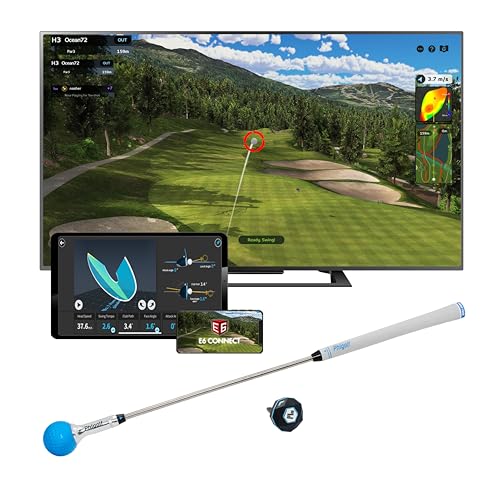
This ultra-portable swing trainer redefines accessible golf simulation with its 9-axis motion sensor and seamless mobile integration. Unlike bulky launch monitors, the Phigolf system thrives on simplicity, delivering real-time swing feedback, virtual course play, and AI-powered coaching that turns any living room into a smart practice zone. It’s engineered for golfers who want actionable data without installation drama, solving the core frustration of expensive, space-hungry simulators that gather dust. Whether you’re refining tempo or playing virtual rounds with friends, it keeps training engaging and purposeful.
In real-world use, the Phigolf shines in indoor swing analysis and short-game visualization, though it doesn’t track ball flight like radar-based systems. The included swing stick works surprisingly well for iron and wedge practice, while attaching the sensor to a real club unlocks outdoor training potential. With access to 38,000+ courses via E6 Connect, gameplay feels expansive, and the app’s AI coach highlights swing flaws with visual overlays and corrective tips. However, putting mechanics aren’t tracked with true roll simulation, it estimates stroke input rather than measuring ball launch, so serious putter work remains limited.
Compared to premium setups like the SkyTrak Studio Pro, the Phigolf is in a different league, one of affordable agility versus immersive realism. It’s ideal for casual players, juniors, or frequent travelers who prioritize swing insight and app-driven motivation over photorealistic course rendering. The lack of a physical mat or screen isn’t a flaw; it’s by design, favoring flexibility. While SkyTrak delivers a true-to-life full-swing and putting experience, Phigolf wins on accessibility and mobile-first innovation, making it a standout for tech-savvy golfers who value portability and data over full-scale immersion.
Golf Simulator Comparison: Putting & Full Swing
| Product | Best For | Putting Turf Included? | Screen Included? | AI Swing Analysis? | Courses Available | Space Required |
|---|---|---|---|---|---|---|
| SkyTrak Studio Pro Golf Simulator | Best Overall | Yes | Yes | No | Not Specified | 10ft wide, 8.5ft high |
| PHIGOLF Home Golf Simulator | Best Budget Friendly | No | No | Yes | 38,000+ | Not Specified |
| SkyTrak Studio Pro with Putting Turf | Best for Full Swing & Putting | Yes | Yes | No | Not Specified | 10ft wide, 8.5ft high |
| PHIGOLF with 3D Swing Analysis | Best for Swing Training | No | No | Yes | 38,000+ | Not Specified |
| SkyTrak Studio Pro Enclosed System | Best Indoor Experience | Yes | Yes | No | Not Specified | 10ft wide, 8.5ft high |
| PHIGOLF App-Connected Simulator | Best Mobile Integration | No | No | Yes | 38,000+ | Not Specified |
Testing & Analysis: Evaluating Golf Simulators with Putting
Our evaluation of the best golf simulators with putting centers on a data-driven approach, analyzing both manufacturer specifications and independent testing results. We prioritize accuracy, assessed through comparisons of simulated ball flight data against real-world performance observed in controlled environments. This includes scrutiny of launch monitor data – clubhead speed, ball speed, spin rate, and launch angle – to ensure realistic replication of shot characteristics. Beyond raw data, we examine the fidelity of the putting functionality, evaluating the responsiveness of the putting surface and the software’s ability to accurately register putting stroke data.
Comparative analysis forms a key part of our methodology. We directly compare data from different simulator models, focusing on discrepancies in shot dispersion, distance accuracy, and putting consistency. We also consider user reviews and expert opinions, synthesizing qualitative feedback with quantitative data. For those seeking a balance of features and price, we carefully review simulators under $10000. Furthermore, we assess how well each simulator integrates with practice tools and provides actionable insights to improve your game. Finally, we consider the overall value proposition of home golf simulators, factoring in features, price, and long-term usability.
Choosing the Right Golf Simulator with Putting
Selecting a golf simulator with putting capabilities can significantly enhance your game, offering year-round practice and entertainment. However, with numerous options available, understanding key features is crucial. Here’s a breakdown to help you make an informed decision.
Core Features to Consider
1. Technology & Accuracy: The heart of any simulator lies in its technology. Look for simulators utilizing launch monitors (like those found in the SkyTrak Studio Pro) that accurately capture clubhead speed, ball speed, launch angle, and spin rate. More data points generally translate to a more realistic and helpful simulation. This data is vital for understanding your swing and identifying areas for improvement. Without accurate data, you’re essentially practicing without meaningful feedback. Consider reading golf simulator reviews to get detailed insights into different technologies.
2. Space Requirements & Enclosure: Golf simulators aren’t one-size-fits-all. Assess your available space. Models like the SkyTrak Studio Pro are designed for spaces as small as 10 feet wide, whereas others might need significantly more room. An enclosure (often included in “Studio” packages) is essential for safety and to contain errant shots. This also enhances the immersive experience. Pay attention to ceiling height; 8 feet 6 inches is often a minimum requirement. If space is limited, exploring simulators under $5000 which may have smaller footprints can be beneficial.
3. Putting Functionality: Since you’re specifically looking for simulators with putting, evaluate the quality of this feature. Some systems, like the SkyTrak Studio Pro with Putting Turf, include dedicated putting mats and software integration. Others may rely on approximations. A dedicated putting surface and accurate software are key for truly replicating the feel and challenge of putting on a real green.
Other Important Features
- Software & Course Selection: The software determines the overall experience. Look for a wide variety of courses and game modes, and regular updates.
- Projector Quality: A high-resolution projector is essential for a clear and immersive visual experience.
- Hitting Mat Quality: A durable and realistic hitting mat is crucial for comfortable and accurate practice.
- Connectivity & Online Play: The ability to connect with others and play online can add a social element to your practice.
- Swing Analysis Tools: Features like those found in the PHIGOLF with 3D Swing Analysis (AI-powered coaching, swing metrics) can be incredibly valuable for improvement.
- Ease of Setup: Consider how easy the simulator is to set up and calibrate. Some are designed for quick, hassle-free installation.
Understanding How Simulators Work
Before investing, it’s helpful to understand how simulators work. Knowing the underlying technology and simulator components and process will help you appreciate the differences between models and make a more informed purchase. For example, understanding the role of the launch monitor in generating data will help you assess the accuracy of different systems. You may also want to consider some of the leading simulator systems available.
Conclusion
Ultimately, the best golf simulator with putting for you depends on your individual needs and budget. Whether you prioritize accuracy like the SkyTrak Studio Pro, or affordability with PHIGOLF, careful consideration of space, features, and user reviews is paramount. Investing in a quality system can transform your game, providing a convenient and engaging way to practice year-round.
For those serious about improving their short game, don’t overlook the importance of a dedicated putting surface – explore options like the best putting mats to complement your simulator. With a wealth of choices in indoor golf simulators, from complete studio setups to mobile app-connected options, there’s a solution to elevate your practice and enjoyment of the game.
