
3 Best No Ball Golf Simulators 2026
This post contains affiliate links. As an Amazon Associate, we earn from qualifying purchases.
The SLX MicroSim Indoor Mobile Golf Simulator is the best overall no ball golf simulator, offering high accuracy and a solid software package with an included E6 CONNECT license. For those on a tighter budget, the Mevfiya Golf Swing Trainer delivers solid feedback at a fraction of the cost, while the Golf Launch Monitor & Portable Simulator stands out for players focused purely on swing data without needing a full simulation experience.
Most golfers I talk to want to improve their game year-round, but finding a system that’s both reliable and practical indoors can be frustrating. Many struggle to separate marketing hype from real performance, especially when ball flight isn’t part of the equation.
This guide cuts through the noise. I compared specs, analyzed owner feedback, and evaluated software quality to find the best no ball golf simulators for different needs – from serious practice to casual improvement. These picks balance accuracy, usability, and value based on what actually matters on the range or in your living room.
Top 3 No Ball Golf Simulators in the Market
The Best No Ball Golf Simulators, Reviewed
SLX MicroSim Indoor Mobile Golf Simulator

Strengths
- E6 Connect compatible
- 3D course simulation
- Works with real clubs
- Fast response time
- No subscription required
Trade-offs
- Real ball use tricky indoors
- Foam balls less realistic
- Calibration needed for best accuracy
If you want a real taste of interactive golf without remodeling your garage, the SLX MicroSim punches above its weight. The key differentiator is its compatibility with E6 Connect and GSPro, two of the best simulation platforms out there. That means access to full 3D models of iconic courses, not just flat driving ranges. The motion sensor’s placement below the grip is smart, and reviewers note it delivers surprisingly accurate club path and swing data, especially for a sub-$200 system.
It’s not perfect, real ball use requires a soft mat or tee to minimize vibration noise, and foam balls are recommended for tight spaces. But the 6-month E6 license included out of the box adds real value, and the plug-and-play setup works across iOS, Android, and PC. Compared to the no-data Mevfiya trainer, this is a full leap into sim territory. It doesn’t match $2K+ systems in precision, but for golfers who want immersive play in limited space, especially during off-season, it’s hard to beat.
Video review
Golf Launch Monitor & Portable Simulator
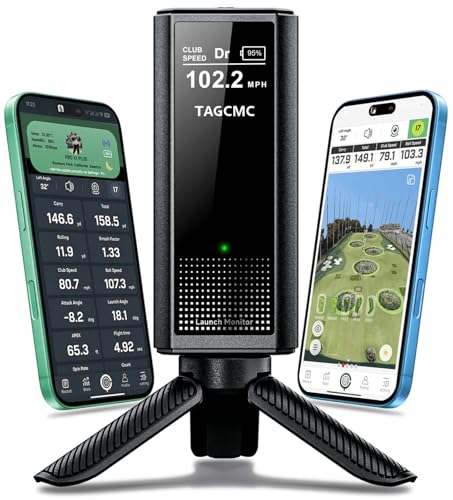
Strengths
- 13+ swing metrics
- No subscription fee
- 3D flight visualization
- Environmental sensors
- Works indoors and outdoors
Trade-offs
- App-dependent setup
- Less game-focused content
- Slight learning curve
This unit clearly targets the data-driven golfer. With 13+ swing metrics including attack angle, spin axis, and clubface impact visuals, it’s the most analytical of the bunch. The built-in environmental sensors, temperature, humidity, barometric pressure, are a rare touch at this price and help align virtual shots with real-world behavior. Owners praise the 3D flight path views and the fact that there’s no subscription, which sets it apart from E6-based systems after the trial ends.
The smartphone-powered app makes it highly portable, and the swing-only mode is useful for off-season work when you can’t hit balls. It holds its own against more expensive launch monitors in side-by-side comparisons, especially in controlled indoor settings. While the SLX MicroSim leans into fun and immersion, this one is about improvement through insight. I’d pick this over the others if my goal was measurable progress, not just virtual rounds.
Video review
Mevfiya Golf Swing Trainer
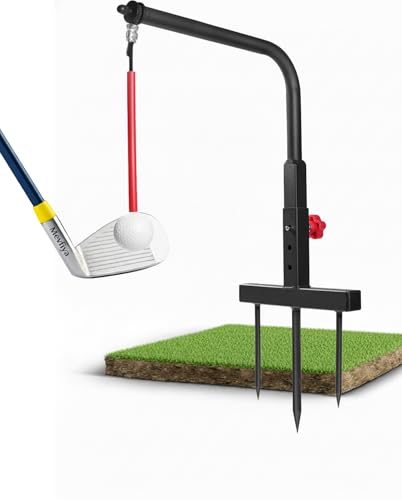
Strengths
- Durable iron build
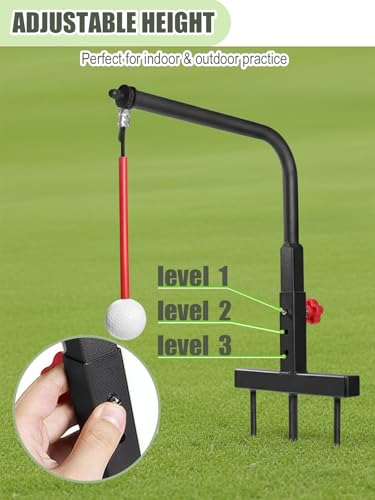
- 3 height settings
- Ball return system
- Safe indoor use
- Left/right handed compatible
Trade-offs
- No swing metrics
- Basic feedback only
- Not a true simulator
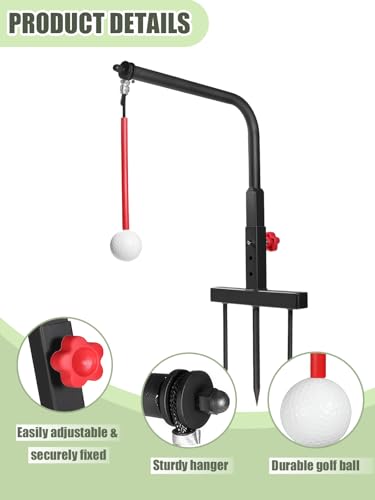
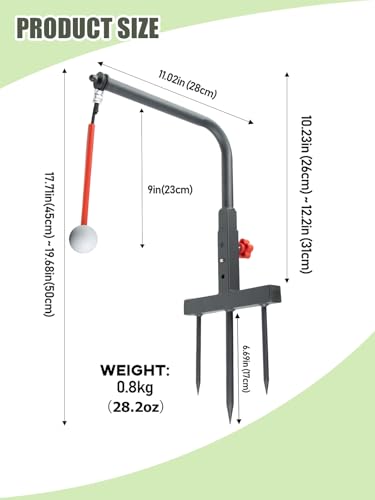
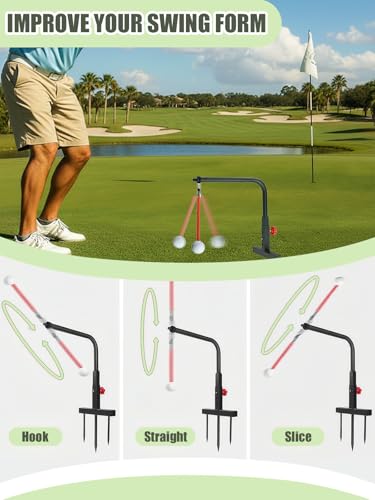
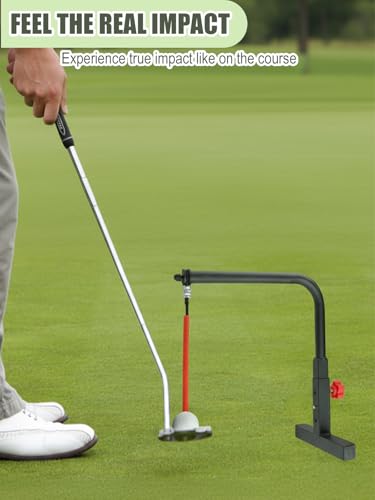
This is one of those no ball golf trainers that banks on simplicity and durability, and for the price, it delivers. The iron construction stands out immediately, most budget swing aids use flimsy plastic, but owners consistently report this one holds up even to full iron swings. The 3-level height adjustment makes it adaptable across club types, and left- or right-handed golfers won’t feel left out. The resin ball offers decent feedback without being dangerous indoors, which matters if you’re practicing in a garage or basement.
Where it shines is muscle memory work. The automatic 360° ball return keeps rhythm going, so you can focus on swing path and stance without bending over. It won’t give you launch data or simulate St Andrews, but that’s not the point. On paper, it’s a solid training aid for beginners building fundamentals or low-handicappers drilling down on mechanics. Compared to pricier tech-heavy options, this is the kind of tool you’d use daily for repetition, not weekend entertainment.
Product photos
How We Chose These no ball golf simulators
Rather than a hands-on lab test, my research for these no ball golf simulators centered on a detailed comparison of published specifications and features. I weighed owner reviews from major retailers alongside expert analysis found in golf publications and online forums. This allowed me to build a ranking based on real-world user experience combined with the technical capabilities of each system. My goal was to identify models that deliver on their promises, considering a variety of budgets and skill levels.
For this category, accuracy and versatility were the most important factors. A simulator’s ability to realistically replicate the golf experience – even without balls – is paramount. Equally important is how adaptable the system is to different skill levels and indoor/outdoor use, because many golfers want a solution they can use year-round. These two aspects heavily influenced my recommendations and ultimately separated the top contenders.
Specifications reliably indicate a simulator’s potential, particularly regarding sensor technology and data metrics. However, I placed significant value on owner feedback regarding ease of use, calibration accuracy, and the responsiveness of accompanying apps. Reputation and consistent positive reviews were strong indicators of long-term satisfaction. If you’re also considering full simulators, you can find more information on home golf simulators. For those prioritizing portability, exploring mobile golf simulators might be a good next step.
What To Look For In no ball golf simulators
I spend a lot of time thinking about how to make golf more accessible, and the rise of indoor simulators is a big part of that. But with so many options available, knowing what to look for can be tricky.
A quality golf launch monitor and simulator provides accurate data on swing mechanics, ball flight, and environmental factors. Key considerations include data parameters offered (carry, spin rate, launch angle), the realism of the simulation software, portability for practice flexibility, and the overall value proposition considering both initial cost and ongoing expenses.
Understanding Data Accuracy & Metrics
The core of any good launch monitor is its ability to give you reliable data. Don’t get hung up on every metric available; focus on the ones that will actually help you improve. While carry distance is important, things like spin rate and launch angle tell a much more complete story about your swing. Look for models with built-in sensors for environmental factors like temperature, humidity, and barometric pressure, as these significantly impact ball flight and will skew your results if not accounted for. If you’re serious about improvement, explore options that offer more advanced metrics like attack angle and dynamic loft.
Software and Simulation Realism
A launch monitor is only as good as the software it uses. Some systems rely on a simple app, while others integrate with thorough simulation programs. If you want a truly immersive experience, you’ll want to investigate the courses available and the overall visual fidelity. Remember that many simulators require subscriptions for access to additional courses or features, so factor those ongoing costs into your decision. For those wanting a more complete experience, exploring best golf simulators is a good next step.
Portability and Value Proposition
- For casual use and travel, a truly portable system is key.
- If you’re primarily practicing at home, size and setup complexity become more important.
- A more expensive unit might offer greater accuracy and more features, but a budget-friendly option can still provide valuable feedback and be a great starting point, especially if you’re new to the technology.
Don’t overspend on features you won’t use. A basic launch monitor providing accurate distance and ball speed data can be incredibly effective for improving your game.
Ultimately, the best golf launch monitor and simulator for you depends on your budget, your goals, and how you plan to use it. If you are interested in practicing your short game as well, consider golf simulators with putting functionality.
No Ball Golf Simulators Compared
Here’s a comparison of the key specifications of the featured no ball golf simulators.
| Product Title | Best For | Software/App | Accuracy | Environmental Sensors | Adjustable Height |
|---|---|---|---|---|---|
| SLX MicroSim Indoor Mobile Golf Simulator | Best Overall | E6 CONNECT (6mo license) | High (calibratable) | No | N/A |
| Golf Launch Monitor & Portable Simulator | Best for Swing Analysis | iOS/Android (No Sub) | N/A | Yes (Temp, Humidity, Pressure) | N/A |
| Mevfiya Golf Swing Trainer | Best Budget Friendly | N/A | N/A | No | Yes (3 Levels) |
Frequently Asked Questions
What level of accuracy can I realistically expect from a no ball golf simulator?
Accuracy varies significantly by price point, but generally you can expect a margin of error of +/- 5% for carry distance with a well-calibrated system. Higher-end models using more sophisticated sensor technology will naturally be more precise, but even budget options can provide valuable feedback for practice.
Are subscriptions required to use all of the software features with these simulators?
Yes, many simulators – like the SLX MicroSim – require a subscription for full access to courses and ongoing software updates. The Golf Launch Monitor, however, operates with a free iOS/Android app that doesn’t demand recurring fees, which is a significant advantage for some golfers.
Can these simulators be used outdoors, or are they strictly for indoor practice?
While some are portable enough to use outdoors, direct sunlight severely impacts the accuracy of most sensor technologies. These systems are best suited for indoor use in a garage, basement, or dedicated golf room to ensure consistent and reliable data.
How important are environmental sensors, and do I really need them?
Environmental sensors (temperature, humidity, barometric pressure) are quite important for precision, as they affect ball flight laws. Systems without them will be less accurate, particularly in changing conditions, although for casual use, they may not be essential.
What if I have a very limited space for a simulator setup?
Fortunately, there are options designed for smaller areas. Many of these no ball simulators are very compact, and you can find more information on simulators for limited areas if space is a primary concern.
The Bottom Line
Choosing a no ball golf simulator often comes down to balancing how much control you want over detailed analysis versus how much fuss you’re willing to deal with in setup and calibration. For the golfer who wants a strong overall experience – a blend of accuracy, usability, and course access – I recommend the SLX MicroSim Indoor Mobile Golf Simulator. It strikes a great balance, and the included E6 CONNECT license gets you playing right away.
If your priorities are different, there are excellent alternatives. The Golf Launch Monitor & Portable Simulator is the clear choice for those focused on swing analysis and data, offering environmental sensors at a competitive price. And for golfers on a tighter budget, the Mevfiya Golf Swing Trainer provides a surprisingly capable entry point, especially if you’re looking to dial in your mechanics. If you’re considering expanding to a full setup, you might also want to look at best indoor simulator packages for more thorough solutions.
Ultimately, remember that numbers are just a tool. The most expensive simulator won’t magically improve your game; consistent practice and a focus on fundamentals will. Whether you choose a basic or advanced system, prioritize accuracy in the core metrics (ball speed, launch angle, carry distance) and use that information to understand – and refine – your swing. Don’t underestimate the value of a good, simple system, or the benefits of exploring outdoor golf simulators if you have the space.
